
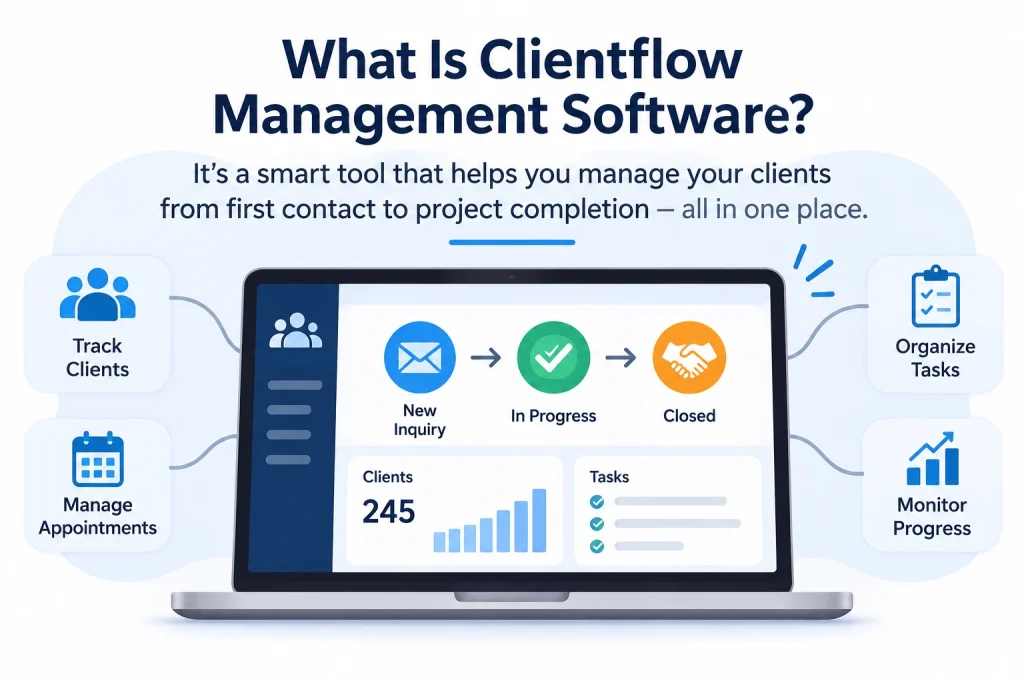
Clientflow management software is a system that manages a client relationship from first inquiry to final payment, keeping leads, proposals, contracts, project work, invoices and follow-ups on one client record.
It replaces the patchwork of inbox, spreadsheet, e-signature tool and invoicing app that many small businesses run on, and it is sometimes grouped under client management software. It is built for businesses that sell and deliver work one client at a time: freelancers, consultants, agencies and studios.
Quick answers
- Who it is for: service businesses that run on proposals, contracts and invoices.
- What it replaces: a CRM, a project tracker, an e-signature tool and an invoicing app used side by side.
- What it costs: roughly $19 to $129 a month per user or account for well-known tools in 2026, plus card-processing fees. Full breakdown below.
- When it is overkill: one or two clients and nothing slipping through.
Most client work does not fail in the work itself. It fails in the gaps around it: the proposal nobody followed up on, the invoice that waited until the project felt finished, the question of what was agreed that is buried in an email thread from March. Clientflow software exists to close those gaps by giving every client one home.
How much time do the gaps take? Freelancer surveys point in the same direction. In freelancermap’s freelancer study, 43% of respondents said they spend 10–20% of their time on non-billable work such as accounting and finding clients, which works out to about five hours in a typical week. A separate Smallpdf survey, reported by ContentGrip, found freelancers losing around 204 hours a year to admin. Both are self-reported panel results, so read them as indicators rather than benchmarks.
Marketing makes these gaps expensive, because an inquiry that cost real ad or content budget to earn can still be lost at the proposal or invoice stage. This guide therefore follows the client from first inquiry to payment: what clientflow software is, how it differs from tools you may already own, what the best-known products cost right now, and how to choose between a ready-made product and a custom build.
What does clientflow management software actually mean?
Clientflow is the route a client takes through your business, from the first message to the last payment. HoneyBook, the vendor most closely associated with the term, uses it for the complete process of selling and delivering your services, and it markets its product as a clientflow management platform. Clientflow management is the practice of running that route deliberately, and clientflow software is the tool that holds it together.
A useful way to see it is as six stages. The table doubles as a quick audit: mark the stage where your own clients most often stall, and you know which feature to prioritise.
| Stage | What happens | Where it usually breaks | What the software does |
|---|---|---|---|
| 1. Capture | A lead arrives by form, email or referral | Inquiries sit in an inbox with no owner | An intake form creates a client record and a follow-up task |
| 2. Propose | You send scope and price | You cannot tell if it was opened; follow-up relies on memory | Proposal tracking and reminders |
| 3. Agree | Contract signed, deposit paid | PDFs go back and forth; work starts unsigned | E-signature and deposit tied to the same record |
| 4. Deliver | Work, feedback, approvals | Status is scattered across threads; scope drifts | Tasks, files, a client portal and message history |
| 5. Bill | Invoices at milestones | Details are retyped; invoices go out late | Invoices built from the signed proposal, with payment plans |
| 6. Close and follow up | Final payment, review request, next project | Overdue invoices chased by hand; repeat work forgotten | Automatic reminders and re-booking prompts |
How is clientflow software different from a CRM, project management or invoicing software?
Clientflow software differs from a CRM because it carries the same client record past the sale into contracts, delivery and billing, while a CRM usually stops at the sales pipeline.
| Tool type | Built around | Usually strong at | Usually missing | Enough on its own when |
|---|---|---|---|---|
| CRM | Contacts and sales pipeline | Lead tracking, communication history | Delivery work and billing | You mainly sell, and invoice elsewhere |
| Project management | Tasks, timelines, deliverables | Managing the work itself | Proposals, contracts, billing | Client work is internal or billed separately |
| Invoicing or accounting | Getting paid and bookkeeping | Invoices, expenses, tax records | Lead tracking, proposals, project updates | You have a few repeat clients and a simple process |
| Clientflow software | One client record from inquiry to payment | Connecting every stage | Deep accounting, large enterprise sales pipelines | You run client work end to end |
These lines are blurring. Many CRMs now add quotes and many project tools add client portals. The practical test is whether one record follows the client from inquiry to payment. If you retype client details when a job moves from one tool to the next, you are managing clientflow by hand.
Not to be confused with ClientFlow, the product
A product literally named ClientFlow also exists. It is a shared inbox and project management tool for client-service teams, launched in 2016 (Product Hunt listing). GitScrum also has a ClientFlow module, described in its documentation as a financial and client-management area for agency owners. If you searched for either, you want those vendors’ pages. This guide is about the category.
Who benefits most, and who does not need it yet
- Solo freelancers gain most from fast proposals, invoices created from the signed proposal, and automatic payment reminders. Multi-brand features and deep automation are rarely worth paying for yet.
- Consultants and coaches depend on a searchable history of what was said and agreed, plus scheduling and milestone or recurring invoicing.
- Agencies and studios need clear ownership of each client stage and role-based access. Check per-user pricing first, because that is where costs grow.
- Small service businesses such as event, photo or home-services companies get the most from deposits, scheduling and reminders that run without a dedicated admin.
As a rule of thumb, you probably do not need it yet if you have one or two clients and nothing is slipping. You probably do if follow-ups have been missed two or three times in a month, you retype client details between tools, or you are asked for status updates more often than you send them. Treat that threshold as a heuristic, not research.
From ad click to signed client: where clientflow software meets marketing
Clientflow software is where marketing spend either turns into revenue or leaks away, because the capture and proposal stages decide how many inquiries become signed clients. Three habits make that visible:
- Record the source of every inquiry on the client record: search, paid ad, referral or email. Without it you can see form fills but not which channel produces signed work.
- Measure cost per signed client, not cost per lead. Divide a channel’s spend by the clients it produced. A cheap lead source that rarely signs costs more than it looks.
- Log the first reply. Note when each inquiry arrived and when someone answered, so slow responses show up in your data instead of in lost deals.
Each marketing channel feeds a different stage. Intake forms and landing pages come from web development. PPC advertising and SEO fill stage 1, so tag them separately to compare cost per signed client. Follow-up sequences for stages 2 and 6 can run through email marketing, and content marketing can answer pricing and process questions before the proposal goes out.
Which features matter most?
Ranked by how directly they touch revenue, each with a test you can run during a free trial.
| Feature | Why it earns its place | Test it during a trial |
|---|---|---|
| Proposals and contracts with e-signature | Shortens the gap between yes and signed work | Send one to yourself; check you can see when it was opened and signed |
| Invoicing and payments | Billing from the signed scope removes retyping and late invoices | Create a deposit plus milestone invoice and check which payment methods work in your country |
| Lead capture forms | Stops inquiries sitting in an inbox | Submit your own form; confirm a client record and a follow-up task appear |
| Automated reminders and workflows | Covers overdue invoices, stalled proposals, onboarding steps | Build one reminder and see whether it needs a higher plan |
| Client portal | Cuts status emails; clients approve and pay in one place | Open it as the client, on your phone |
| Scheduling | Books calls without back-and-forth | Book a call and check calendar sync |
| Reporting | Shows what is overdue and where each client stands | Ask it: which clients owe me money, and for how long? |
Scheduling is the feature most often covered by a separate tool. If bookings run through your own website, read booking software vs WordPress booking plugins before paying twice for the same job.
How much does clientflow management software cost in 2026?
Well-known clientflow tools cost about $19 to $129 a month for one user or account in 2026, before card-processing fees. Prices moved a lot over the past year, so older roundups are often wrong. The table shows the realistic starting plan for the full proposal-to-invoice workflow, for one user, in US dollars.
| Tool | Realistic starting plan | Monthly billing | Annual billing | Five-year subscription at today’s annual rate | Worth knowing |
|---|---|---|---|---|---|
| HoneyBook | Starter | $36 | $29/mo ($348/yr) | $1,740 | Flat per account. Available only to businesses in the US, Canada, UK and Australia. Higher plans add more automation and scheduling. |
| Dubsado | Starter | $35 | $335/yr | $1,675 | Starter leaves out scheduling and automated workflows. Premier is $55/mo or $525/yr ($2,625 over five years). Expect setup time. |
| Bonsai | Essentials, per user | $25 | $19/mo ($228/yr) | $1,140 | Per-user pricing. The $15 Basic plan has no invoicing. Owned by Zoom since December 2025. |
| 17hats | Single plan | $60 | $600/yr | $3,000 | Flat price. Monthly document limits depend on billing term. |
Prices were compiled on 3 November 2026 from independent price trackers that cite each vendor’s pricing page. Vendors run promotions and change plans often, so confirm on the pricing page before you buy. Three things the headline numbers hide:
Older prices still circulate. HoneyBook’s monthly Starter price rose from $19 to $36 in February 2025, and Dubsado’s Starter moved from $20 to $35 a month in December 2025. If a comparison still shows the lower numbers, it is out of date.
Card fees can cost more than the subscription. HoneyBook’s card rate is reported at 2.9% plus 25 cents per payment, and Bonsai and 17hats at 2.9% plus 30 cents, while Dubsado passes its payment processor’s fees through, typically via Stripe. At 2.9%, $50,000 collected by card costs $1,450 in percentage fees alone, about four times HoneyBook’s $348 Starter subscription. Almost any way of collecting cards has a fee, so the lesson is not that one tool is unusually expensive. Compare payment rates alongside subscription prices.
Five-year totals assume prices stay flat, which history suggests is optimistic. Treat the last column as a floor, not a forecast.
Ready-made or custom-built?
A ready-made product wins on speed. You can run a real client through it within days, and the vendor handles payment compliance, security updates and bug fixes. A custom build starts to make sense when your process genuinely fits no template, when the system must live inside your own product or portal, or when per-user fees across a large team begin to exceed what a build would cost to run.
Custom is not free after launch. Budget for hosting, security patches, payment-provider updates, and someone who understands the code when the original developer moves on. To test whether a build pays off, use this formula:
Years to break even = custom build cost ÷ (yearly subscription and seat fees you would stop paying − yearly cost to run and maintain the custom system)
Hypothetical example: a $15,000 build replacing a $3,000-a-year tool stack, with $1,000 a year to host and maintain, breaks even in 7.5 years ($15,000 ÷ $2,000). Swap in real quotes before deciding, because the answer swings widely with team size and scope.
If you do go custom, how you brief and manage the build matters as much as the price. How to work with a software agency and how to hire a dedicated development team cover the practical steps.
Where AI fits in 2026
Clientflow tools increasingly add AI for drafting proposals and emails, summarising meetings and flagging priority leads. HoneyBook, for example, has announced a ChatGPT integration and an MCP connector for asking AI assistants about pipeline, invoices and contracts, according to its blog. When you evaluate any of these, ask three questions: what client data is sent to the AI, can it be switched off per account, and is it included in your plan or an upgrade? Treat AI drafts as drafts. Pricing and contract terms always need a human check before they reach a client.
How to choose: five steps
- Map your journey. Use the six-stage table and circle the stage costing you the most.
- Filter by where you work. Confirm the tool supports your country, currency and payment processor before comparing features. HoneyBook, for instance, serves only four countries.
- Price the plan you will need in two years. Count seats, brands and the automation tier you actually want, not the entry price.
- Run one real client through the trial. Go from inquiry to paid invoice, and open every client-facing page on a phone.
- Check the exit. Confirm you can export contacts, projects, invoices and message history, and in what format.
Switching tools without losing client history
- List where client data lives today: spreadsheets, inboxes, an old CRM, accounting software.
- Clean duplicates and outdated contacts before importing, not after.
- Import in stages, with active clients first and history second.
- Spot-check three complete client records against the originals.
- Keep the old tool read-only for at least a month.
Common mistakes
- Choosing on the entry price instead of the price of the plan with the features you need.
- Letting one person pick a tool that someone else will use daily.
- Ignoring per-user pricing until the second hire.
- Bending your process to a template instead of mapping it first.
- Skipping the export check.
- Moving every client at once instead of piloting with one.
Frequently asked questions
What is clientflow management software?
It is a system that manages a client relationship from first inquiry to final payment in one place, covering lead capture, proposals, contracts, project updates, invoicing and follow-ups. It suits freelancers, consultants, agencies and other businesses that deliver work to individual clients.
Is clientflow software the same as a CRM?
No, though they overlap. A CRM centres on contacts and the sales pipeline. Clientflow software carries the same client record past the sale into contracts, delivery and billing. If you only sell through the tool and invoice elsewhere, a CRM may be enough.
Is it worth it if I only have a few clients?
Usually not yet. The value appears when manual tracking starts to fail through missed follow-ups, retyped details or late invoices. With one or two clients, a simple template set and an invoicing app often cover it.
How does clientflow software help turn marketing leads into clients?
It keeps every inquiry on a client record with its source, proposal status and follow-up task, so no lead depends on memory. It also lets you work out cost per signed client for each channel, instead of stopping at cost per lead.
How much does clientflow management software cost?
Well-known products run from about $19 to $129 a month depending on plan and billing term, plus card-processing fees that are commonly around 2.9% plus 25 to 30 cents per payment. See the pricing table above for each tool.
Which clientflow software is best for freelancers?
There is no single best. HoneyBook suits freelancers in its four supported countries who want flat per-account pricing. Dubsado suits those who want deep customisation and accept setup time. Bonsai has a lower per-user entry price but charges per seat. Choose by your country, payment options and how much automation you need.
Can I use clientflow software outside the US?
It depends on the tool. HoneyBook says it supports professionals in the US, Canada, UK and Australia. For any other product, check supported countries, currencies and payment processors before you start a trial.
What happens to my data if I switch?
That depends on the export options. Ask before you sign up whether you can export contacts, projects, invoices and message history, and in which format.
Conclusion
Clientflow management software is worth considering once the gaps between inquiry, contract, delivery and payment start costing you time or money. Map your own six stages, pick the tool that covers the stage where you lose the most, and test it with a real client before committing. If nothing fits your process, price a custom build honestly with the break-even formula above.
Want inquiries to land in a system built to catch them? Talk to NK Marketing Solutions about the lead-generation side: website intake, SEO, paid ads and email follow-up.