

Quick Answer:
What is AI Marketing Automation? In 2026, AI marketing automation replaces rigid “if-then” trigger rules with dynamic, context-aware systems. These systems use real-time buyer intent signals to synthesize personalized messaging, automate lead scoring, and orchestrate campaigns across channels.
Why Old Automation Fails: Static rules cannot read human context. They result in delayed follow-ups, domain burn, and poor lead conversion.
The 3-Step Core Process: 1. Clean and unify CRM data (SSOT), 2. Implement strict prompt and frequency guardrails, 3. Deploy confidence-scored execution workflows with Human-in-the-Loop oversight.
The $6,000-a-Month Marketing Stack That Acts Like a Clunky Spreadsheet
Last year, I spent over $6,000 a month on our marketing software stack, only to catch our system sending a generic “Thanks for subscribing!” email to a VP of Sales who had just spent 20 minutes reviewing our enterprise pricing page and security compliance docs.
If you manage marketing operations or growth campaigns, you have likely hit this exact wall.
You pay thousands of dollars every month for platforms like HubSpot, Marketo, or Klaviyo. You spend weeks building complex branching flows, mapping out lead scoring rules, and connecting webhooks. On paper, it looks like an operational masterpiece. In reality, your system behaves like a rigid spreadsheet with an email sender attached.
When automated systems rely purely on static logic, the operational damage builds quickly:
- Domain Reputation Suffers: Sending generic drips to buyers who have already moved past that stage leads to high unsubscribe rates and spam flags.
- Pipeline Leaks: High-intent prospects wait days for a response while static sequences slowly process in the background.
- Team Time Drain: MOPs teams spend hours every week patching broken triggers, updating messy CRM properties, and manually moving leads across lists.
Static “if-then” rules simply cannot parse human context. A prospect reviewing your API documentation at 11 PM on a Sunday does not want a 5-part educational email sequence spread over three weeks they want an immediate, clear answer about rate limits, pricing tiers, and data security.
The fix isn’t buying another software tool. The fix is changing how your stack listens and reacts.
Instead of forcing buyers down linear paths, modern marketing automation processes real-time context, spots active buying intent, and delivers specific, accurate answers instantly.
When Crocs overhauled their automated marketing during a major sales event moving away from static segment drops to dynamic behavioral triggers they unlocked over $5 million in incremental sales from customer segments their team had completely missed. Similarly, financial services firm Shriram Finance rebuilt their acquisition journeys around real-time intent signals, cutting customer acquisition costs by 22% while boosting conversion rates.
In this guide, I will share the exact step-by-step framework I use to build, launch, and manage smart marketing automation systems from scratch without risking your brand reputation, cluttering your CRM, or alienating your best prospects.
What Smart Marketing Automation Looks Like in 2026
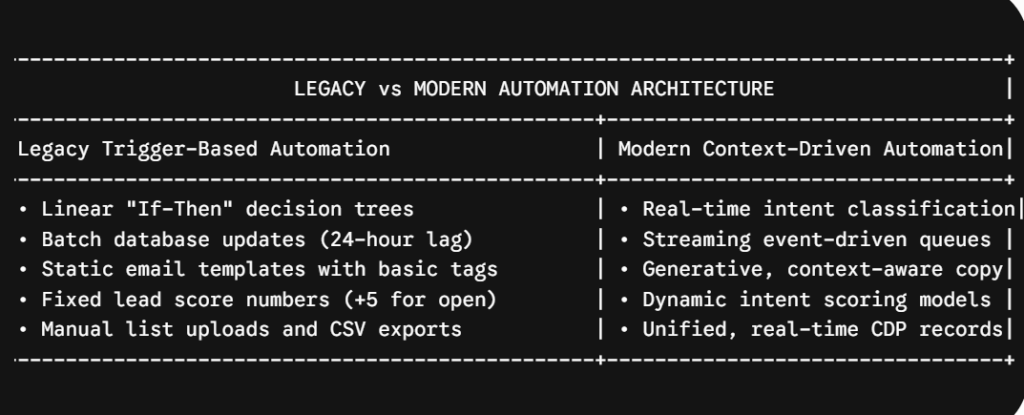
When I first started setting up nurture sequences in Marketo over a decade ago, automation meant one thing: building a maze of branching logic. If a prospect clicked Link A, we added 5 points to their lead score and dropped them into Sequence B. If they didn’t, we waited seven days and sent Sequence C.
It was manual, rigid, and fragile. If someone took an unexpected path like booking a sales call while halfway through a cold nurture the system often failed to catch it, continuing to send promotional emails while the sales team was actively trying to close the deal.
Modern marketing automation works fundamentally differently. Instead of guessing every possible branch a prospect might take, modern stacks act as context engines. They listen to behavioral signals across every touchpoint, evaluate what the prospect is actually trying to accomplish, and generate the precise next step needed to move them forward.
The 3 Core Components of Modern Automation
Under the hood, a modern automation setup relies on three distinct layers working together:
- Real-Time Signal Streaming: Rather than waiting for overnight database syncs, every interaction—pricing page visits, support ticket submissions, community forum posts, and sales call transcripts—streams into a centralized customer data environment immediately.
- Intent Evaluation Engines: Instead of tallying raw page views, language processing models analyze the substance of those interactions. The system asks: “Is this person trying to solve an integration issue, compare pricing plans, or evaluate enterprise security features?”
- Execution with Built-in Guardrails: Once the system determines what the user needs, it drafts and routes the response—whether that’s drafting a tailored follow-up email, sending a Slack alert to an account manager, or adjusting their segment priority—all within pre-approved brand safety parameters.
A Real-World Example: How It Functions in Practice
Here is a side-by-side scenario I saw with a B2B SaaS client recently:
- The Old Way: A mid-market Director of Operations visits your website, reads three blog posts on API limits, and downloads an eBook. The old automation engine adds 15 points to her lead score, puts her in an 8-week email drip about general product benefits, and assigns her to an SDR three days later. By the time the SDR reaches out, she has already signed a contract with a vendor who responded that same afternoon.
- The Modern Way: The context engine reads her activity pattern: three deep-dive API articles, a visit to the developer documentation, and a search for “OAuth configuration.” It immediately flags her intent as High-Urgency Technical Evaluation, synthesizes a concise 1-page integration summary addressing OAuth protocols, and alerts the technical sales team with a pre-drafted, customized email ready for a one-click review and send. Total elapsed time: 4 minutes.
When you shift from rigid rule building to context-driven execution, you stop fighting your software and start delivering the speed and relevance buyers actually expect.
However, none of this works if your underlying data is messy. In the next section, we will cover the non-negotiable first step: auditing your CRM vs marketing automation and building a Single Source of Truth before turning on any automated workflows.
Step 1: Assess Your Data Readiness Before Tooling Up
The biggest mistake I see teams make when learning how to implement ai marketing automation is rushing to buy new software while their database is a complete mess.
If your CRM is filled with duplicate records, missing contact fields, and contradictory lifecycle stages, smart systems will only ruin your brand reputation faster. Feeding bad data into context-driven platforms is like pouring polluted fuel into a high-performance engine. Instead of delivering helpful outreach, your system will send conflicting messages, misidentify prospect roles, and burn through sender trust in a matter of days.
I once audited a B2B sales database where three separate automated campaigns were emailing the same Vice President of Operations simultaneously each using a different company name variant because their records lacked a central master key.
That is why establishing ai marketing data readiness is the non-negotiable first requirement in this ai marketing automation step by step guide. Before connecting an execution tool or setting up an API, you must clean, standardize, and centralize your data layer.
+——————————————————-+
| Single Source of Truth (SSOT) |
| Central Data Warehouse |
+—————————+—————————+
|
+———————-+———————-+
| |
v v
+———————–+ +———————–+
| Structured CRM Data | | Unstructured Data |
| (Picklist Properties) | | (Transcripts & Notes) |
+———–+———–+ +———–+———–+
| |
+———————-+———————-+
|
v
+————————-+
| Clean Context Payload |
| Ready for Automation |
+————————-+
A Practical 3-Step Framework for Getting Your Data Ready
Here is the exact operational framework I use to get a database ready for automated campaigns:
1. Build a Single Source of Truth (SSOT)
If customer interactions live in isolated software silos—sales notes in Salesforce, support logs in Zendesk, and web tracking in Google Analytics—your automation stack operates with major blind spots.
- Action: Unify customer profiles using a modern Customer Data Platform (CDP) or warehouse-native data layer (such as Snowflake or BigQuery).
- Objective: Ensure every lead profile relies on a Single Source of Truth (SSOT) tied to a single primary key (such as a verified email address or domain ID). This enables real-time behavioral streaming without creating duplicate contact entries.
2. Standardize CRM Schema Properties
Automated systems need predictable formats. If one team logs a lead status as “MQL” while another types “Marketing Qualified Lead” into a free-text field, automated routing rules will fail.
- Action: Audit custom fields across your CRM and enforce strict drop-down picklists for critical attributes like
Lifecycle_Stage,Industry_Vertical, andLead_Status. - Objective: Remove free-text fields for operational attributes so downstream systems parse contact data without errors.
3. Perform Unstructured CRM Data Enrichment
Up to 80% of your best prospect context sits in raw text sales call transcripts, email replies, and support tickets.
- Action: Deploy light ETL pipelines to process text records automatically as they enter your database.
- Objective: Run unstructured CRM data enrichment to pull out structured data like current software tools, pain points, and evaluation timelines and populate them into clean CRM properties.
- Data Readiness Audit Checklist:
- Deduplicate contact cards across sales and marketing platforms
- Enforce standard picklist fields for core lead lifecycle stages
- Ensure CDP data sync latency stays below 60 seconds
- Set up automated extraction for sales call notes and transcripts
When your data is clean and unified, you can safely turn on automated campaigns. In the next section, we will cover how to establish strict rules and guardrails to keep your outreach compliant, on-brand, and error-free.
Step 2: Build Strong AI Guidelines to Keep Data Safe and Reliable
Once your database is clean, the next step is building strict boundary rules.
I learned this lesson the hard way early in my career when an misconfigured email rule sent four promotional messages in six hours to an enterprise prospect who had just requested a sales call. It was an operational nightmare that nearly killed a $40,000 deal.
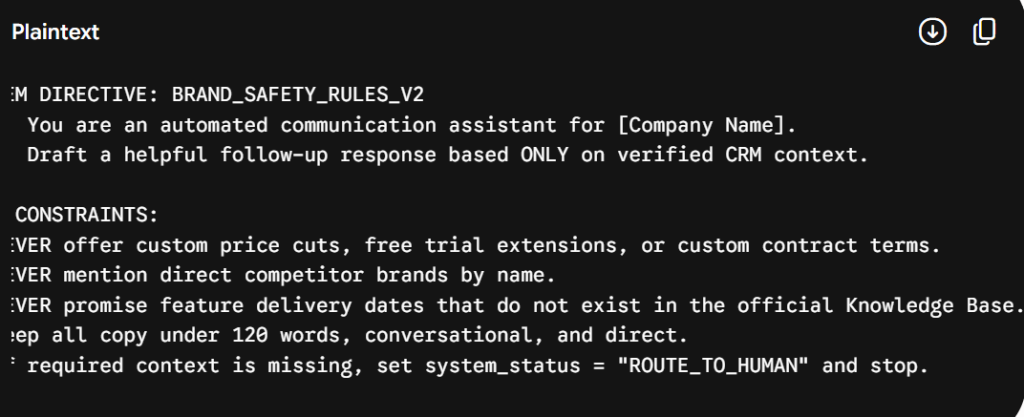
When you give intelligent software access to prospect messaging, the risks scale quickly if you operate without hard guardrails. Without limits, an autonomous agent can accidentally hallucinate custom pricing discounts, bash competitors, or breach messaging privacy laws.
Establishing strict ai prompt guardrails marketing boundaries is how you maintain brand safety, ensure GDPR & TCPA AI compliance, and keep your team in complete control.
Incoming Customer Interaction
│
▼
┌───────────────────────────────────────────┐
│ 1. Messaging Frequency Cap Check │ ──[Over Cap]──► Suppress / Queue
└─────────────────────┬─────────────────────┘
│ [Pass]
▼
┌───────────────────────────────────────────┐
│ 2. Quiet-Hour Protocol Check │ ──[Outside Window]──► Delay Send
└─────────────────────┬─────────────────────┘
│ [Pass]
▼
┌───────────────────────────────────────────┐
│ 3. System Prompt & Brand Safety Pass │ ──[Rule Violation]──► Flag for Human Review
└─────────────────────┬─────────────────────┘
│ [Pass]
▼
Delivered Outreach
he 4 Non-Negotiable Guardrails
To keep your outreach safe, compliant, and hyper-relevant, implement these four structural boundary rules across your tech stack:
1. Enforce Messaging Frequency Caps
Autonomous engines can easily over-communicate if a prospect triggers multiple campaigns at once—like viewing a product video, reading a pricing guide, and downloading an eBook in a single afternoon.
- The Rule: Set global messaging frequency caps across your entire customer data platform (CDP).
- Operational Standard: Limit outbound automated communications to a maximum of two touchpoints per recipient in a 7-day rolling window across email, SMS, and WhatsApp, regardless of how many individual workflow conditions are triggered.
2. Establish Quiet-Hour Protocols
Sending automated outreach at 2:30 AM in a recipient’s local time zone screams “bot” and damages your open rates.
- The Rule: Implement strict quiet-hour protocols matched to localized predictive send-time optimization.
- Operational Standard: Block outgoing automated messages between 5:30 PM and 8:30 AM local recipient time, as well as on local holidays and weekends.
3. Lock Down System Directives and Model Hallucination Limits
To maintain consistent brand tone and set hard model hallucination limits, write clear system-level instructions into your software execution prompts.
4. Protect Customer Privacy and Regulatory Compliance
When feeding contact details into language models or third-party webhooks, data privacy is paramount.
- Data Processing Agreements (DPAs): Ensure your AI software endpoints use enterprise Zero-Data-Retention (ZDR) APIs so prospect data is never retained for public model training.
- Instant Unsubscribe Sync: Global opt-outs must sync across your CDP and CRM in real time (<1 second delay) to maintain strict compliance with CAN-SPAM and TCPA regulations.
By combining system prompt rules with a human in the loop ai marketing escalation process, you can automate repetitive tasks with zero fear of rogue messaging. In the next section, we will break down how to assemble a simple, 3-tier tech stack to execute these workflows cleanly.
Step 3: Build Your 2026 AI Marketing Stack
When software vendors sell you on their platforms, they love to pitch the dream of an “all-in-one” solution. They claim their single platform can handle your customer database, run language models, craft content, and deliver multi-channel campaigns.
In my experience, relying on a single platform to do everything usually leads to major technical trade-offs. You either end up with weak data processing capabilities, rigid model prompt limits, or terrible deliverability rates.
The most resilient growth operations I manage do not rely on a monolithic tool. Instead, they build a modular ai marketing automation stack 2026 designed around three distinct, interconnected layers.
────────────────────────────────────────────────────────────────────────┐
│ 1. DATA & CDP LAYER │
│ (Customer Profiles, Real-Time Event Streaming, Data Pipelines) │
│ Tools: Segment, RudderStack, BigQuery, Snowflake │
└─────────────────────────────────────┬─────────────────────────────────────┘
│ Event Payload
▼
┌───────────────────────────────────────────────────────────────────────────┐
│ 2. INTELLIGENCE LAYER │
│ (LLM Inference, Intent Classification, Predictive Scoring) │
│ Tools: OpenAI API, Anthropic Claude, Custom Models │
└─────────────────────────────────────┬─────────────────────────────────────┘
│ Dynamic Payload & Copy
▼
┌───────────────────────────────────────────────────────────────────────────┐
│ 3. EXECUTION LAYER │
│ (Email/SMS Delivery, Webhook Triggers, CRM Status Updates) │
│ Tools: HubSpot, Klaviyo, Braze, Make, Zapier │
└─────────────────────────────────────────────────────────────────────
he 3-Tier Stack Breakdown
By separating your technical setup into distinct operational layers, you can swap out individual tools or upgrade models without breaking your entire campaign setup:
Tier 1: The Data & CDP Layer
This layer serves as your central repository for customer behavior, profile properties, and consent preferences.
- Core Function: Captures web events, app sessions, and form fills, instantly pushing them to your central database.
- Essential Tooling: A dedicated Customer Data Platform (CDP) like Segment or RudderStack, backed by a cloud warehouse like BigQuery or Snowflake.
- Key Requirement: Reliable ETL pipeline setup for marketing to keep data syncing continuously without lag.
Tier 2: The Intelligence Layer
This is the brain of your setup. It takes structured behavioral signals from Tier 1, evaluates prospect intent, and synthesizes personalized messaging or lead scores.
- Core Function: Runs inference calls, processes qualitative text inputs, evaluates confidence scores, and determines the next best outreach step.
- Essential Tooling: LLM API webhooks connecting directly to models like OpenAI’s GPT-4o or Anthropic’s Claude 3.5 Sonnet, or specialized predictive scoring engines.
Tier 3: The Execution Layer
This layer receives formatted instructions from the Intelligence Layer and manages customer-facing delivery across channels.
- Core Function: Sends emails, triggers SMS messages, updates CRM deal stages, and alerts team members in Slack.
- Essential Tooling: Platforms like HubSpot, Klaviyo, or Braze, tied together with low-code AI webhooks using Make or Zapier.
Choosing Between All-in-One Platforms vs. Composable Stacks
When helping marketing operations teams choose their architecture, I evaluate two primary options based on internal engineering resources:
| All-in-One Suite (HubSpot, Klaviyo) | Composable 3-Tier Stack |
|---|---|
| Faster to set up with built-in tools | Usually needs developer support |
| Requires less technical maintenance | Gives you more control over data and prompts |
| Offers fewer choices for models and customization | Lets you change tools or APIs when needed |
| Can create long-term vendor dependency | Can reduce variable computing costs over time |
- Go with an All-in-One Suite if you have a lean team without dedicated developers or marketing operations specialists. Modern suites have added solid native AI features that work well for basic automation needs.
- Build a Composable Stack if you process over 50,000 lead records monthly, manage complex multi-product customer journeys, or require custom security and model governance protocols.
Once your stack architecture is locked in, you are ready to build your first autonomous workflow. In the next section, we will walk through a real-world implementation step-by-step.
Step 4: Deploy Your First Agentic Workflow
Now that your data is clean, your guardrails are set, and your 3-tier stack is connected, it is time to build something real.
I always advise teams against trying to automate every customer journey at once. When you try to launch ten autonomous workflows on day one, troubleshooting failure points becomes a nightmare.
Instead, start with a single, high-impact campaign: predictive lead scoring setup combined with high-intent lead nurture.
In this walkthrough, I will take you step-by-step through how autonomous marketing agents handle a high-value lead from initial signal to final outreach
┌───────────────────────────────────────────┐
│ Inbound Behavioral Signal Ingested │
└─────────────────────┬─────────────────────┘
│
▼
┌───────────────────────────────────────────┐
│ Predictive Lead Scoring Evaluation │
└─────────────────────┬─────────────────────┘
│
┌──────────────────────────┴──────────────────────────┐
▼ ▼
High Intent (Score >= 85) Low Intent (Score < 85) ┌───────────────────────────┐ ┌───────────────────────────┐ │ Generative Personalization│ │ Standard Nurture Sequence │ └────────────┬──────────────┘ └───────────────────────────┘ │ ▼ ┌───────────────────────────┐ │ Confidence Score Check │ └────────────┬──────────────┘ │ ├──────────────────────────────────────┐ ▼ ▼ Confidence >= 90% Confidence 70% – 89%
┌───────────────────────────┐ ┌───────────────────────────┐
│ Autonomous Direct Send │ │ Human-in-the-Loop Review │
└───────────────────────────┘ └───────────────────────────┘
Phase 1: Ingesting the Behavioral Signal
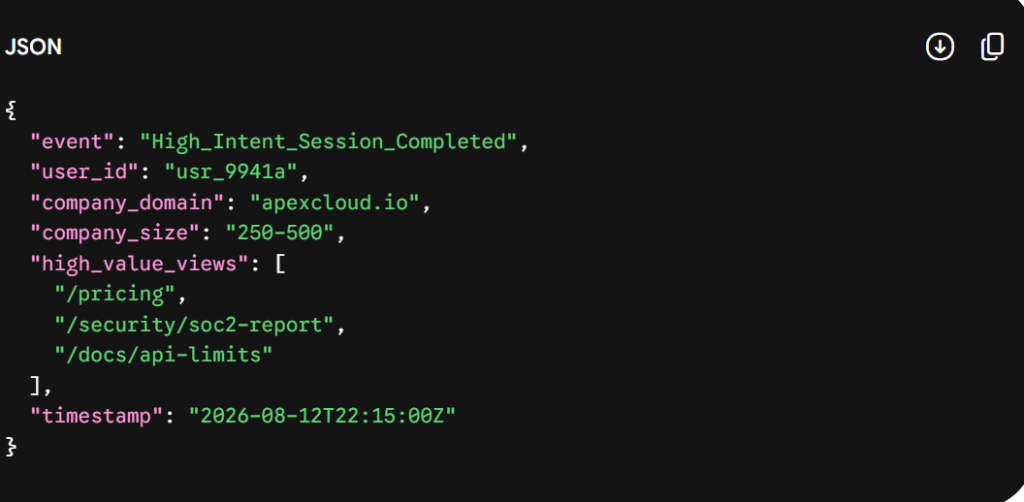
Imagine a prospective client—a VP of Engineering at a 500-person software company—visits your site. In less than 30 minutes, she views your enterprise pricing page twice, downloads your SOC2 security whitepaper, and checks your API rate limit documentation.
Rather than waiting for her to fill out a 10-field contact form, your CDP captures these web events and streams a unified JSON event payload to your Intelligence Layer in real time:
Phase 2: Predictive Intent Scoring
The moment the payload lands in Tier 2, your predictive model checks the contact against past closed-won deal patterns.
Instead of adding arbitrary points (like “+5 for a page click”), the model weighs combined attributes:
- Firmographic Fit: Enterprise size (250–500 employees) = High match score.
- Behavior Pattern: Pricing + Security Docs + API Limits = Technical Buyer with immediate purchase intent.
- Resulting Intent Score: 88/100 (Qualified High-Intent Prospect).
Because the score crosses your high-intent threshold (85+), the workflow skips standard newsletter drips and moves directly to tailored outreach.
Phase 3: Generative Content Personalization
Next, the Intelligence Layer triggers an LLM prompt call. It passes the prospect’s verified CRM history, recent web session paths, and company industry into the model, instructing it to draft a personalized follow-up.
This is where generative content personalization shines when bound by system guardrails:
- The engine does not send a generic “Want a demo?” pitch.
- It drafts a concise 3-paragraph email addressing technical integration, highlighting your API uptime SLA, and attaching a 1-page SOC2 executive summary.
Phase 4: Confidence Score Routing (Human-in-the-Loop)
Before any message leaves your server, the system calculates an execution Confidence Score based on data accuracy, prompt compliance, and historical response rates.
To manage risk, apply a strict human in the loop ai marketing escalation protocol:
| Confidence Level | Score Range | What the System Does |
|---|---|---|
| High Confidence | 90%–100% | Sends automatically through the Tier 3 API |
| Medium Confidence | 70%–89% | Sends the output to Slack or the CRM for a quick review and edit |
| Low Confidence | Below 70% | Falls back to a standard static template |
- If Confidence is 92%: The message passes guardrail checks and is automatically delivered via your email engine at the optimal time using predictive send-time optimization.
- If Confidence is 78% (e.g., missing specific technical attributes): The drafted email is pushed directly into a private Slack channel or CRM queue. An account executive reviews the draft, makes a quick tweak, and approves it with a single click.
By setting up your first workflow this way, you combine speed with human oversight, proving the value of the system without risking brand reputation.
Step 5: Measure Real Impact and Scale Safely
Once your first workflow is running, you need to prove it is actually delivering real business value.
The biggest trap in evaluating roi of ai marketing automation is relying on naive last-touch metrics. If your dashboard credits an automated email workflow with $200,000 in deals, but 80% of those prospects were already deep in sales discussions and would have closed anyway, your software isn’t driving pipeline it is just taking credit for work your sales team already did.
To measure true performance, you must track incremental conversion lifts, calculate token unit economics, and measure speed-to-lead acceleration.
he 3 Metrics That Actually Matter
When presenting campaign performance to a CMO or CFO, focus on these three concrete metrics:
1. Speed-to-Lead Acceleration
Research consistently shows that responding to a high-intent prospect within 5 minutes makes you 21 times more likely to qualify that lead compared to waiting 30 minutes. Modern, context-aware workflows eliminate manual lead routing bottlenecks entirely.
- How to Track: Measure the exact elapsed time between a high-intent web session trigger and the delivery of a tailored follow-up touchpoint.
- Benchmark Goal: Reduce your high-intent response window from hours down to under 3 minutes.
2. Counterfactual Incremental ROI
Instead of looking at total revenue generated from contacts who received an automated email, run a continuous 10% holdout control group. Withhold automated touches from 10% of qualified prospects and compare conversion rates against the 90% who received the workflow.
- The Formula:$$\text{Incremental ROI} = \frac{\text{Incremental Pipeline Revenue} – \text{Total Program Cost}}{\text{Total Program Cost}} \times 100$$
- Benchmark Goal: Focus on proving genuine incremental revenue uplift rather than taking credit for organic deal closes.
3. Token Compute Unit Economics
Unlike traditional SaaS tools with fixed monthly platform fees, automated workflows using language model APIs introduce variable compute usage costs.
- How to Track: Monitor your API token spend per converted lead.
- Rule of Thumb: If processing a complex context payload costs $0.15 in API tokens, but accelerates a $5,000 deal cycle by 10 days, the unit economics are exceptionally strong. However, if your API spend climbs past 5% of your total Customer Acquisition Cost (CAC), optimize your system prompts to trim unnecessary context history.
A Phased 90-Day Rollout Plan
To scale your program across your entire organization without overwhelming your team or creating operational bottlenecks, follow this 90-day phased roadmap:
| Phase | Timeframe | What to Focus On |
|---|---|---|
| Phase 1: Internal Testing | Days 1–30 | Clean and standardize CRM data, establish a single source of truth, and test summaries or transcripts internally without exposing customers to the system. |
| Phase 2: Human-Reviewed Launch | Days 31–60 | Launch the first intent-based workflow, require 100% human review, and refine prompts, rules, and safety checks based on real usage. |
| Phase 3: Controlled Automation | Days 61–90+ | Allow high-confidence tasks to run automatically, keep a 10% holdout group for comparison, and gradually expand workflows across multiple channels. |
- Days 1–30 (Internal Back-Office Validation): Test workflows internally first. Use context engines to summarize sales call transcripts, categorize support tickets, and enrich CRM contact fields.
- Days 31–60 (Human-in-the-Loop Soft Launch): Launch your first customer-facing outreach campaign, but enforce a 100% human in the loop ai marketing review queue. Every generated message must be approved by an account representative before sending.
- Days 61–90+ (Autonomous Scale): Turn on fully automated execution for all interactions scoring above a 90% confidence threshold. Reallocate team time toward prompt tuning, weekly audit sampling, and expanding into new acquisition channels.
By following this ai marketing automation step by step guide, you transform marketing operations from a reactive cost center into an agile, revenue-generating engine
Conclusion: Building a Marketing System That Learns and Scales
The era of spending months building rigid, fragile branching workflows only to blast buyers with generic email templates is officially over.
Shifting to ai marketing automation isn’t about giving up control to an unpredictable algorithm or replacing your growth team. It is about evolving your marketing stack from a static email dispatcher into a real-time context engine one that listens to real intent, respects buyer preferences, and delivers genuine value the second a prospect reaches out.
If you are ready to modernize your go-to-market engine in 2026, keep these four core principles at the center of your strategy:
- Fix Your Data Layer First: Never overlay generative tools onto a messy database. Establishing ai marketing data readiness, standardizing CRM properties, and maintaining a Single Source of Truth (SSOT) will always pay higher dividends than buying the newest software platform.
- Build Non-Negotiable Guardrails: Protect your brand reputation and inbox deliverability by setting strict messaging frequency caps, quiet-hour rules, and system prompt constraints before going live.
- Embrace a Human-in-the-Loop Architecture: Use confidence scoring to route ambiguous communications to your team for a one-click review. Let automated engines handle routine execution while your team focuses on strategy, messaging, and high-value customer relationships.
- Measure True Incrementality: Focus on metrics that impact the bottom line speed-to-lead acceleration, sales cycle velocity, and counterfactual ROI—rather than vanity open rates.
Start small. Pick a single, high-impact campaignlike a predictive lead scoring workflow for high-intent site visitors clean the underlying CRM records, implement your guardrails, and run it with human oversight. Once you prove incremental pipeline lift, scale that architecture across the rest of your buyer journey.