
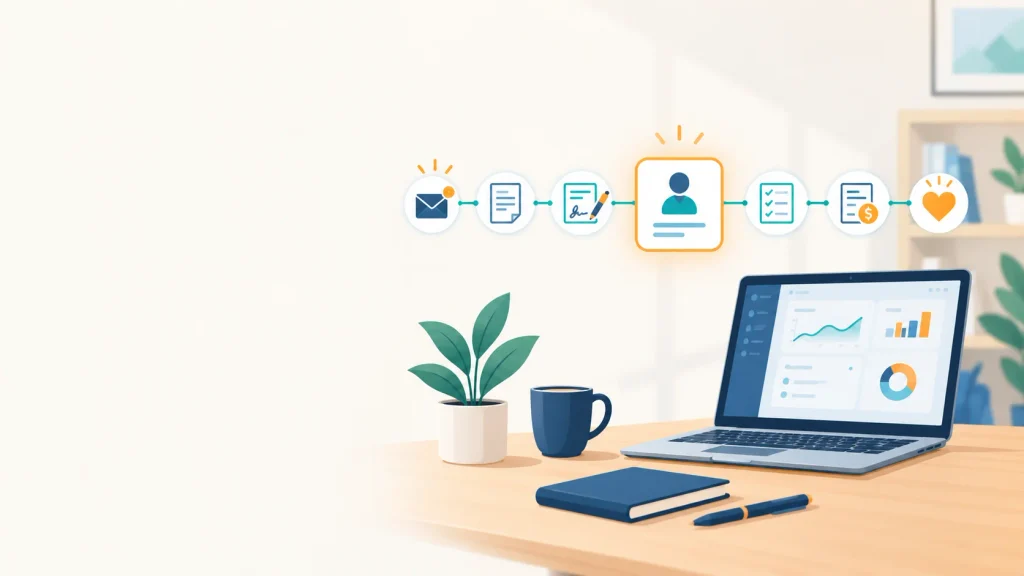
Quick answer: Clientflow management software is a single system that follows a client from the first inquiry to the final payment. Leads, proposals, contracts, project updates, messages, and invoices all live on one client record, so nobody has to hunt through five different tools to see where things stand.
In short
- It combines the jobs of a CRM, a project management tool, and invoicing software for businesses that sell services.
- Prebuilt tools such as HoneyBook, Dubsado, Plutio, Bonsai, and 17hats fit most small teams. Custom builds fit unusual processes.
- Compare the real cost, including payment fees and add-ons, not just the starting price.
- Pilot with one live client and test the data export before you commit.
Most client problems aren’t really about the work. They’re about loose ends: a reply that never got sent, a proposal nobody chased, an invoice that went out three weeks late. None of it is dramatic, but it adds up in lost leads and slow payments.
Clientflow software is built to catch those loose ends. This guide covers what it is, which features matter, what the main tools cost in 2026, when custom software makes sense, and how to switch without upsetting clients you’re already serving.
NK Marketing Solutions helps small businesses across California win leads through SEO, PPC, email, and web projects. A lead only becomes revenue if someone follows up, so we look at the whole path here, from the first message to the final invoice.
What Is Clientflow Management Software?
Clientflow management software is a client lifecycle platform for service businesses. It gives each client one record that holds the inquiry, proposal, signed contract, tasks, messages, invoices, and payment status, so anyone on the team can see the current stage and the next step without asking around.
“Clientflow” is just the path a client takes through your business. Consultancies, agencies, studios, and freelancers mostly follow the same six stages, often called lead to cash:
- Capture. A website form, email, call, or social message creates a lead.
- Qualify and propose. You confirm the lead is a good fit and send a quote.
- Sign. The client approves and signs, usually with an e-signature.
- Deliver. Tasks, files, deadlines, and updates sit against that client’s record.
- Get paid. Invoices go out from the same record, with online payment and reminders.
- Keep. Review requests, check-ins, and renewal offers bring the client back.
Stage six gets the least attention, yet a client who has just paid you is your warmest lead for the next project.
You may also see labels such as client lifecycle management, client onboarding software, client portal software, or CRM for freelancers. They overlap with clientflow software, but each usually covers only part of the path.
Why Do Businesses Need Clientflow Software?
Because client work is full of small handoffs, and handoffs that depend on memory eventually fail. Software swaps memory for a record and a reminder. These are the usual failure points:
| Where it fails | What it looks like | What the software does |
|---|---|---|
| Lead capture | Inquiries sit in an inbox or a DM thread | Logs every inquiry and creates a follow-up task |
| Proposals | You can’t tell whether anyone opened the quote | Shows status and prompts you before the lead goes cold |
| Communication | Decisions are buried in old email threads | Keeps messages, notes, and files attached to the client |
| Billing | Client details get retyped into a separate invoicing app | Builds the invoice from the existing record |
| Ownership | The person doing the work is also doing the tracking | Automates reminders so admin stops competing with billable hours |
If finding out where one client stands takes you more than a minute, your inbox has probably stopped being enough.
Which Clientflow Features Matter Most?
For small teams, lead tracking, proposals with e-signatures, and invoicing matter most, because that’s where revenue moves. Client portals, reporting, and advanced automation earn their cost as the client list grows. Here is each feature with the question worth asking before you pay.
| Feature | What it does for you | Ask the vendor |
|---|---|---|
| Lead capture and tracking | Turns form fills and inquiries into tracked leads | Can I embed forms on my own website and record the lead source? |
| Proposals and contracts | Sends quotes, tracks opens, collects e-signatures | Are templates editable, and are e-signatures valid for my clients? |
| Project and task tracking | Ties deadlines and files to each client | Can I see every active client in one view? |
| Communication history | Keeps one thread per client | Is it searchable, and does it sync with my email? |
| Invoicing and payments | Builds invoices from the client record and takes online payments | What are the processing fees, and who sets them? |
| Client portal | Lets clients check status, pay, and approve work | Can I brand it with my logo and domain? |
| Automations | Sends reminders and follow-ups on schedule | Which automations are on my plan, and which cost extra? |
| Integrations | Connects accounting, calendar, and payment tools | Is the sync one-way or two-way? |
| Security and permissions | Protects client data and limits access by role | Does it offer two-factor login and role-based access? |
| Reporting | Shows pipeline, overdue invoices, and revenue by client | Can I export both reports and raw data? |
Two of these need a little more explanation.
E-signatures. In the US, the federal ESIGN Act of 2000 gives electronic signatures the same legal standing as handwritten ones for most commercial contracts, though a few document types are excluded. Make sure your tool stores a signed copy with a record of who signed and when.
AI assistance. Most tools now offer AI help for drafting emails, summarizing calls, or flagging priority leads. It saves time, but see whether it’s included in your plan or sold as credits. For a look at how these systems are built, read our guide to the 3 pillars of AI platform architecture.
What Is the Best Clientflow Software in 2026?
There isn’t one best tool. HoneyBook suits creatives and consultants with many client touchpoints, Dubsado suits detailed custom workflows, Plutio suits teams that also manage projects, Bonsai suits freelancers who want contracts and tax tools, and 17hats suits small service businesses that want one bundle.
Prices here change often, and several vendors restructured their plans in the past year. The table is a snapshot from vendor pricing pages and third-party price trackers checked between spring and October 2026. We haven’t tested each tool hands-on for this guide, so confirm current prices and use free trials before you pay.
| Tool | Best for | Main plans (2026, approximate) | Watch out for |
|---|---|---|---|
| HoneyBook | Creatives, consultants, and service pros with many client touchpoints | Starter $36/mo, Essentials $59/mo, Premium $129/mo (about $29, $49, and $109 when billed yearly) | Card processing fees on top; automations and team seats begin at Essentials |
| Dubsado | Businesses that want detailed, customized workflows | Starter about $35/mo, Premier about $55/mo (roughly $335 and $525 a year) | Plans were restructured with Dubsado 3.0; extra brands and users cost more |
| Plutio | Teams that need project management beside client tracking | Core $19/mo, Pro $49/mo, Max $199/mo | Entry plan limits active clients; AI credits vary by tier |
| Bonsai | Freelancers who want contracts, invoicing, and tax tools | Tiers from about $9 to $59 per user per month | Per-user pricing adds up as the team grows; tiers changed in 2026 |
| 17hats | Small service businesses that want CRM, invoicing, and scheduling together | One main plan around $60/mo for new sign-ups, plus paid add-ons | Its lineup shifted again in autumn 2026; check the live page |
How Is Clientflow Software Different from a CRM or Project Management Tool?
A CRM tracks contacts and sales, project management software tracks tasks, and invoicing software tracks payments. Clientflow software connects all three around one client record, trading some specialist depth for breadth.
| CRM | Project management | Invoicing software | Clientflow software | |
|---|---|---|---|---|
| Built around | Contacts and pipeline | Tasks and timelines | Billing and payments | The whole client path |
| Lead tracking | Yes | No | No | Yes |
| Proposals and contracts | Sometimes | No | Rarely | Yes |
| Tasks and deadlines | Limited | Yes | No | Yes |
| Client portal | Sometimes | Sometimes | Sometimes | Usually |
| Invoicing | Rarely | Rarely | Yes | Yes |
| Best fit | Sales-heavy teams with large pipelines | Teams running internal projects | Anyone who only needs to get paid | Service businesses delivering client work end to end |
If you only need one of those jobs done well, the specialist tool is usually enough. If your work runs from first inquiry to final payment, the combined tool saves you from retyping the same details in three places.
How Much Does Clientflow Software Cost in 2026?
A solo account on a popular tool costs roughly $10 to $130 a month in 2026, and more once you add team members, automations, or extra brands. Card processing fees are charged on top.
The starting price leaves out a few things:
- Payment processing. HoneyBook charges 2.9% plus 25¢ per card payment. On $100,000 of card payments a year, that’s about $2,900 before the per-transaction fee. Most card processors charge similar rates, so compare the rate as carefully as the subscription.
- Plan gating. Automations, team seats, and branding removal often sit on mid or top tiers.
- Add-ons. Extra brands, users, scheduling, and time tracking can be billed separately.
- Billing cycle. Yearly billing usually costs less. HoneyBook Starter runs $432 a year when billed monthly and $348 when billed annually.
- Your time. Setup, data cleanup, and training take real hours, even though no invoice arrives for them.
HoneyBook’s published rates show how a subscription adds up (subscription only, no processing fees):
| HoneyBook plan | Per year, billed monthly | Per year, billed annually | Five years, billed annually |
|---|---|---|---|
| Starter | $432 | $348 | $1,740 |
| Essentials | $708 | $588 | $2,940 |
| Premium | $1,548 | $1,308 | $6,540 |
Any custom build has to beat these numbers once upkeep is included.
Should You Buy, Build, or Combine?
Most small businesses should buy first. Prebuilt tools are quick to start, tested by thousands of users, and maintained by the vendor. Build only if your process truly doesn’t fit a template, because custom software also means hosting, backups, and security patches that you now own.
The case for custom is fit. It starts from your intake, pricing, and approvals, and it can connect to exactly the tools you use. The catch is that someone has to keep it running, fix it when a payment or email provider changes how it connects, and be available if the original developer moves on.
A simple way to check the math:
Break-even years = build cost ÷ (yearly subscription spend − yearly upkeep)
For example (made-up numbers): an $8,000 build that replaces $1,308 a year in subscriptions and costs $600 a year to maintain saves $708 a year, so it takes about 11 years to break even. Custom wins on fit, and only sometimes on price.
A middle route works for many businesses: a prebuilt clientflow tool, a well-built website with connected intake forms, and automated email follow-ups. Our web development and email marketing services often sit on either side of that setup.
| Your situation | Likely best route |
|---|---|
| Standard process, one to five people, want to start this month | Prebuilt tool |
| Standard process, but leads come from several marketing channels | Prebuilt tool plus tracked website forms and email automation |
| Unusual pricing, intake, or approvals that no template handles | Custom or heavily customized build |
| Sensitive data with strict compliance rules | Prebuilt with strong security, or custom with a security review |
| Large team where per-seat fees dominate the budget | Run the break-even math on both |
How Do You Choose the Right Clientflow Software?
Map your process, shortlist two or three tools, pilot one with a real client, and score the finalists. Here is the order that works best:
- Map your client path. Write every step from inquiry to final payment and who handles it. Wherever you catch yourself saying “we do it differently,” note it. Those are your fit risks.
- List five must-haves. Choose the features you’d miss most, such as e-signatures, a client portal, or QuickBooks Online sync. Everything else is a bonus.
- Price it at your real size. Ask what the bill looks like with your team, client volume, and payment total two years from now, fees included.
- Check export and security. Confirm you can download all client records, and ask about two-factor login and role-based access.
- Run a 14-day pilot. Take one real client from inquiry to invoice. Demos hide problems that a live client finds fast.
- Score the finalists. A weighted scorecard keeps personal preference from deciding for you.
- Set a 90-day review. Define now what “working” means, such as faster invoicing or fewer missed follow-ups.
A sample scorecard:
| Criterion | Suggested weight |
|---|---|
| Fit with your real process | 30% |
| True cost, including fees and add-ons | 20% |
| Ease of daily use | 20% |
| Data export and security | 15% |
| Integrations | 10% |
| Support quality | 5% |
Teams that switch tools twice often skipped step one. They picked on price or popularity before writing down how their own clients move.
How Do You Migrate Client Data Without Disruption?
Move in stages over about four weeks: clean the data, import core records, pilot with one client, then switch everyone and keep the old system read-only for a month.
| Week | Focus | What to do |
|---|---|---|
| 1 | Audit and clean | List where client data lives, remove duplicates, fix formatting, and decide what isn’t worth moving |
| 2 | Import core records | Export to CSV, import contacts first, and check a sample against the original |
| 3 | Pilot | Run one active client through the full flow with the person who’ll use the tool every day |
| 4 | Switch over | Move the rest in batches and keep the old system read-only for at least a month |
Useful fields to carry over: name, email, phone, company, lead source, status, project dates, contracts, invoice history, and key notes.
Privacy is the point people often skip. If you serve California customers, the California Consumer Privacy Act may apply to the personal information you hold. Don’t import data you’re no longer entitled to keep, and make sure the new system can honor deletion requests. This is general information, not legal advice, so check with a qualified professional for your situation.
What Mistakes Should You Avoid?
The common ones are shopping by starting price, leaving out the person who’ll use the tool daily, moving every client at once, and ignoring where leads come from.
| Mistake | Why it hurts | Fix |
|---|---|---|
| Shopping by starting price | The features you need often sit on a higher tier | Price your must-haves, not the cheapest plan |
| Leaving out the daily user | The tool gets picked by one person and abandoned by another | Let the daily user run the pilot |
| Moving every client at once | Errors are hard to trace | Move one client first, then batches |
| Ignoring lead source | You can’t tell which channel pays | Tag the source on every record |
| Automating everything on day one | Misfiring reminders annoy clients | Start with three: lead follow-up, proposal nudge, invoice reminder |
Which Clientflow Software Fits Your Business Type?
Freelancers need speed from proposal to invoice, agencies need clear roles, small businesses need automation without an admin, consultants need searchable history, and local service businesses need fast replies. In more detail:
Freelancers. Fast proposal templates, one-click invoicing, and a basic client portal cover most needs. Multi-brand support and heavy automation can wait until you have something to automate.
Agencies. Sales, delivery, and billing all touch the same client, so the tool should show who owns each stage and stop people overwriting each other’s work. Agencies tend to outgrow simple tools first.
Small businesses. Follow-ups and invoicing should run on their own, and nobody should need to be a full-time software administrator.
Consultants. Consulting is relationship work, so a searchable communication history matters more than fancy templates. Losing track of what was agreed in a session costs more than any automation saves.
Local service businesses. Clinics, studios, and home-service companies lose leads that wait a day for a reply. Look for instant lead alerts and easy scheduling.
How Do You Connect Clientflow Software to Your Marketing?
Record the lead source on every client record and give each channel its own tagged form. That tells you which marketing brings paying clients, not just form fills.
- Tag the source. Note whether each client came from organic search, paid ads, social media, a referral, or email.
- Tag each channel. Leads from SEO services, PPC advertising, and social media marketing behave differently. Separate forms and UTM parameters on your links make them comparable.
- Reply fast. Instant alerts and a same-day response protect the money you spent to earn the lead.
- Use stage six. After the final invoice, send a review request and a check-in. That’s where email follow-ups pay off.
- Publish proof. Case studies and guides from content marketing answer the questions leads have before they write to you.
Some buyers now ask AI search tools for provider shortlists. Our article on AI search analytics with ZipTie covers how brands track their visibility in those answers.
Conclusion
Clientflow software keeps everything about a client in one place, from first inquiry to final invoice. For most small businesses, a prebuilt tool is the practical start, ideally connected to a good website and automated follow-ups. Custom software is worth considering when your process won’t bend and the break-even math, including upkeep, still works.
If you’d like help connecting your leads to your client system, from web forms to follow-up emails, contact the NK Marketing Solutions team or browse more guides on our blog.
Frequently Asked Questions
What is clientflow management software in simple terms?
It’s software that tracks a client from first inquiry to final payment in one place. Leads, proposals, contracts, updates, messages, and invoices share a single record, so you always know the stage and the next step.
How is clientflow software different from a CRM?
A CRM focuses on contacts and the sales pipeline. Clientflow software adds proposals, contracts, project tracking, and invoicing, so it covers the work after the sale too.
What is the best clientflow software for freelancers?
HoneyBook and Bonsai are common starting points because both cover proposals, contracts, and invoicing. Compare payment fees, tax tools, and portal features, and trial both before paying yearly.
How much does clientflow software cost?
Popular tools run roughly $10 to $130 a month for a solo account in 2026. Team seats, add-ons, and card processing fees raise the total, so confirm current prices on the vendor’s site.
Is clientflow software worth it with only one or two clients?
Usually not yet. A spreadsheet and a calendar can cope at that size. It starts paying off when missed follow-ups, scattered messages, or late invoices appear.
Does clientflow software work with accounting and calendar tools?
Most tools connect to common accounting and calendar apps, but depth varies. HoneyBook, for example, offers QuickBooks Online integration from its Essentials plan. Ask whether the sync is one-way or two-way and what it covers.
What happens to my data if I switch platforms?
That depends on the export options. Most tools export CSV files, but message history and signed contracts may not transfer cleanly, so test an export during your trial.
Do I need technical skills to set it up?
No. Prebuilt platforms are made for non-technical users and often run within a day using templates. Custom builds need a developer and take longer.
Is client data safe in these tools?
Reputable platforms offer encryption, access controls, and two-factor login, though features differ. Ask about role-based permissions, and if you serve California customers, consider how the CCPA applies to the data you store.