Enterprise AI agents can now handle more than simple conversations. They can retrieve business information, use connected tools, update records, route requests, and complete multi-step workflows. That makes enterprise AI agents useful across customer service, sales, operations, finance, IT, and internal support. Businesses can also connect these systems with broader AI marketing automation workflows to manage customer signals, lead qualification, personalization, and repetitive marketing tasks.
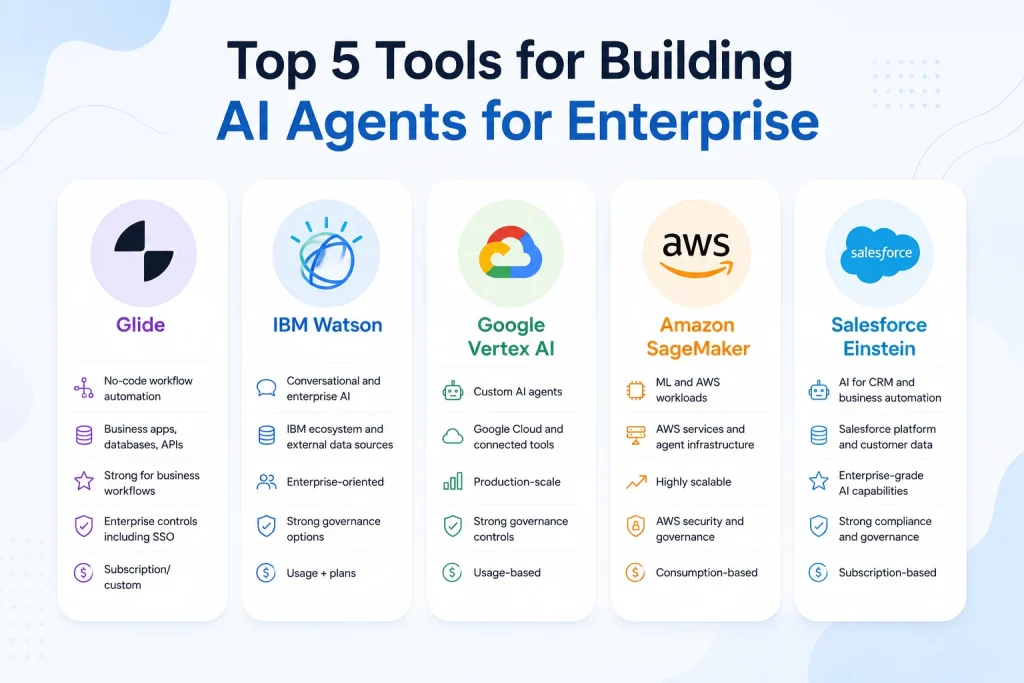
Choosing among the top 5 tools for building AI agents for enterprise depends on the job, not just the feature list. Glide focuses on no-code automation. IBM Watson targets enterprise AI and conversational workloads. Google Vertex AI gives developers broader control. Amazon SageMaker supports demanding machine-learning environments. Salesforce Einstein and Agentforce connect AI closely with CRM operations.
Quick Comparison of the Top 5 AI Agent Tools
Each platform approaches agent development differently. Glide suits teams that want to build workflows quickly without extensive coding. IBM Watson fits organizations that need conversational AI and governed enterprise development. Google Vertex AI provides a flexible environment for building, deploying, and governing agents. Amazon SageMaker works best within technical AWS and machine-learning environments. Salesforce Einstein and Agentforce focus heavily on CRM-driven workflows.
The top 5 tools for building AI agents for enterprise should therefore be compared against the same criteria. The table below focuses on the factors that usually affect a purchasing decision rather than simply counting features.
| PlatformBest ForIntegrationsScalabilitySecurity & GovernancePricing Model | |||||
|---|---|---|---|---|---|
| Glide | No-code workflow automation | Business apps, databases, APIs | Strong for business workflows | Enterprise controls including SSO | Subscription/custom |
| IBM Watson | Conversational and enterprise AI | IBM ecosystem and external data sources | Enterprise-oriented | Strong governance options | Usage + plans |
| Google Vertex AI | Custom AI agents | Google Cloud and connected tools | Production-scale | Strong governance controls | Usage-based |
| Amazon SageMaker | ML and AWS workloads | AWS services and agent infrastructure | Highly scalable | AWS security and governance | Consumption-based |
| Salesforce Einstein | CRM-based agents | Salesforce ecosystem and external systems | Enterprise-scale | Trust Layer and access controls | Consumption/user licensing |
The right platform becomes clearer when the business process is specific. A customer-service agent needs different capabilities from an invoice agent. Likewise, an AWS engineering team may value model and infrastructure control more than a sales department that wants an agent inside its CRM.
How to Choose the Right Enterprise AI Agent Tool
Start with the workflow. Define what information the agent receives, which systems it can access, what decisions it can make, and which actions it can perform. This gives the evaluation a measurable foundation instead of turning it into a feature-shopping exercise.
For example, an HR agent may need approved policy documents and a ticketing system. A sales agent may need CRM records and product information. A finance agent may need invoices, accounting data, approval rules, and strict access permissions. The best AI agent platform for enterprise use is the one that handles those requirements with reasonable complexity and cost.
What Makes an AI Agent Different From a Chatbot?
A chatbot mainly responds to a user’s message. An AI agent can pursue a defined task by retrieving information, calling tools, following instructions, and taking approved actions. A customer-service agent could check an order, identify a delivery problem, update a case, and escalate an unusual request.
That difference makes AI agent development more demanding than ordinary chatbot development. The platform needs to handle tool access, permissions, context, workflow logic, monitoring, and failure handling. A system that generates excellent answers may still perform poorly when it needs to change a real business record.
What Should Enterprises Check Before Buying?
Integration depth should come first. Then examine identity controls, data access, monitoring, model options, deployment methods, human approvals, and operating costs. An agent that cannot safely connect to the systems employees already use will have limited practical value.
Governance also needs careful attention. An agent may access customer information, financial records, contracts, or internal documents. Strong AI governance helps administrators control what the agent can see and do.Liveness detection is another important security consideration for AI-powered identity verification workflows. It helps verify that the user is a real, live person rather than someone attempting to use a photo, video, or other spoofing method
1. Glide – Best for Rapid No-Code AI Agent Deployment
Glide is designed for teams that want to build business applications and AI-powered workflows without relying heavily on traditional software development. Its current enterprise offering supports business data sources, integrations, workflows, APIs, and AI capabilities. Enterprise plans include features such as SSO, custom user limits, custom update volumes, dedicated account management, and support.
The strongest use case is a clearly defined business process. An operations team could automate invoice handling, document review, inspections, or another repetitive workflow. The value comes from connecting AI to the process rather than using AI as a standalone chat interface.
Glide Key Features
Glide combines no-code AI agents with application building and workflow automation. Business users can create internal tools while connecting data from supported sources. Its Enterprise plan also supports large data sources and business integrations, including Salesforce, HubSpot, Stripe, Intercom, SQL, and BigQuery.
That approach reduces the distance between the person who understands the workflow and the person building the automation. A department can shape the application around its actual process rather than translating every small requirement into a developer ticket.
Glide Integrations
Glide’s Enterprise plan supports SQL and BigQuery alongside third-party business services such as Salesforce, HubSpot, Stripe, and Intercom. It also provides Glide APIs for workflows that need to exchange information with other systems.
These connections matter when an agent needs current business information. An order-processing workflow, for example, becomes more useful when it can work with live records rather than a manually maintained spreadsheet.
Glide Scalability
Glide’s Enterprise plan supports custom users and update volumes. Its published Enterprise information also lists Big Tables with support for up to 10 million rows per app, along with SQL, BigQuery, and third-party service connections.
That makes Glide more suitable for growing business workflows than a basic prototype-only tool. However, highly specialized AI architectures may still require a developer-focused platform.
Glide Security and Governance
Enterprise controls include SSO, custom access-related limits, dedicated account support, and business-oriented administration. These features help organizations manage a larger internal deployment.
The important consideration is workflow governance. Before allowing an agent to perform consequential actions, administrators should define which data it can access and which operations require human approval.
Glide Use Cases
| Use CaseWhy Glide Fits | |
|---|---|
| Invoice processing | Automates repetitive document workflows |
| Internal tools | Business teams can build without extensive coding |
| Sales operations | Connects business data with workflows |
| Inspections | Turns structured processes into digital workflows |
| Administrative automation | Reduces repetitive manual tasks |
Glide Pricing
Glide’s current Business plan costs $199 per month when billed annually or $249 monthly. The plan includes 10 editors, 30 business-email users, and 5,000 updates per month. Enterprise pricing is custom.
For a commercial evaluation, calculate more than the subscription. Include users, updates, integrations, implementation time, and the labor removed from the workflow.
Glide Pros, Cons, and Buyer Suitability
| ProsCons | |
|---|---|
| Fast no-code development | Less suited to deeply customized agent architectures |
| Strong business workflow focus | Advanced engineering teams may need more control |
| Useful enterprise integrations | Pricing grows with business usage |
| Enterprise SSO and support | Complex AI systems may require another platform |
Best buyer: Operations teams and business departments that want rapid workflow automation with limited coding.
2. IBM Watson – Best for Enterprise Conversational AI
IBM Watson fits organizations that need conversational AI alongside broader enterprise AI development. Its watsonx.ai platform supports foundation models, retrieval-augmented generation, agents, machine-learning tools, and deployment capabilities. IBM also offers watsonx.governance for managing AI risk, compliance, monitoring, and accountability.
The platform makes particular sense for organizations that need a governed AI environment rather than a standalone assistant. It can support employee assistants, customer interactions, knowledge retrieval, and larger AI application programs. Marketing teams can also evaluate AI content platforms for marketing teams when deciding how agent workflows should connect with content research, production, and campaign operations.
IBM Watson Key Features
watsonx.ai provides tools for working with foundation models, RAG, agents through AgentLab, machine learning, model deployment, and other AI development tasks. That makes it broader than a conventional chatbot builder.
RAG is particularly useful when an enterprise wants an agent to answer from approved business information. Instead of relying only on general model knowledge, the application can retrieve relevant information from connected sources before generating an answer.
IBM Watson Integrations
IBM’s ecosystem supports enterprise AI development across models, data, applications, and governance tools. The exact integration path depends on the workload and IBM service being used.
For a company with existing IBM infrastructure, that ecosystem can reduce architectural fragmentation. Organizations using other cloud or business systems can still connect external services, but the integration effort should be tested during the evaluation stage.
IBM Watson Scalability
IBM offers different watsonx.ai plans for evaluation and production. Its Standard plan is designed for enterprise production workloads and includes a monthly capacity allocation with additional usage metered separately.
IBM also positions watsonx.governance for organizations that need to manage AI use cases, model risks, compliance assessments, monitoring, and AI inventories.
IBM Watson Security and Governance
Governance is one of IBM’s stronger enterprise considerations. watsonx.governance provides capabilities around AI asset detection, risk assessment, compliance applicability, model evaluation, and monitoring.
That matters when an enterprise moves from experimental AI to regulated or business-critical workloads. The technology must support accountability as well as model performance.
IBM Watson Use Cases
| Use CaseWhy IBM Watson Fits | |
|---|---|
| Customer support | Strong conversational foundation |
| Employee assistants | Enterprise knowledge access |
| Knowledge retrieval | RAG capabilities |
| AI application development | Broader watsonx.ai tooling |
| Governed AI programs | Dedicated governance capabilities |
IBM Watson Pricing
IBM currently offers a free Lite option, a pay-as-you-go Essentials plan, and a Standard plan. The Standard watsonx.ai Runtime plan is listed at $1,110 per month and includes 2,500 capacity unit hours, with additional usage charged separately. <a href=”https://www.ibm.com/products/watsonx-ai/pricing” rel=”nofollow”>See IBM watsonx.ai pricing</a>.
Model costs can also vary. IBM lists separate pricing for foundation models, embeddings, third-party models, hosting, and other capabilities.
IBM Watson Pros, Cons, and Buyer Suitability
| ProsCons | |
|---|---|
| Strong enterprise AI ecosystem | Can feel complex for small teams |
| RAG and agent development | Costs vary across services |
| Dedicated governance capabilities | Requires careful architecture planning |
| Broad AI development options | Better suited to serious enterprise workloads |
Best buyer: Large organizations that need conversational AI, enterprise AI development, and formal governance capabilities.
3. Google Vertex AI – Best for Custom Enterprise AI Agents
Google Vertex AI is a strong option when an organization wants more control over agent development. Google describes Vertex AI Agent Builder as a suite for building, scaling, and governing AI agents in production. Its documentation also covers Agent Development Kit and Agent Engine capabilities.
The platform works especially well for technical teams already using Google Cloud. It provides a path from experimentation to production without forcing developers into a single simple agent-building model.
Vertex AI Key Features
Vertex AI Agent Builder supports agent development, deployment, and governance. Developers can work with tools, enterprise data, models, and production infrastructure. Google also provides enhanced tool governance for controlling which tools an agent can access.
This matters when an agent can perform actions. A company may allow one agent to read customer information while restricting another agent from modifying records or calling sensitive APIs.
Vertex AI Integrations
Vertex AI fits naturally with Google Cloud services and can connect agents to enterprise data and tools. The platform’s value increases when the organization already uses Google Cloud infrastructure and identity services.
For businesses with a mixed technology stack, integration testing remains essential. The important question isn’t whether an API exists. The question is whether the agent can use that API securely, reliably, and at the required volume.
Vertex AI Scalability
Google positions Agent Builder for production-scale agent development. Agent Engine provides managed runtime capabilities while supporting production workloads.
Pricing also reflects that production architecture. Google began billing for additional Agent Engine services in January 2026, including code execution, stored session events, memory storage, and memory retrieval.
Vertex AI Security and Governance
Google has added enhanced tool governance that gives enterprises more control over agent tool access. The controls help address a central enterprise concern: an agent should not automatically receive unrestricted access to every connected service.
That makes governance part of the architecture rather than something added after deployment. Teams should define tool permissions before moving agents into production.
Vertex AI Use Cases
| Use CaseWhy Vertex AI Fits | |
|---|---|
| Custom enterprise agents | Developer control |
| Knowledge assistants | Enterprise data grounding |
| Multi-step workflows | Tool and agent support |
| Customer applications | Production deployment options |
| AI development programs | Google Cloud ecosystem |
Vertex AI Pricing
Agent Engine uses usage-based pricing. Google’s published 2026 pricing includes charges for runtime, code execution, sessions, and memory-related services. Runtime pricing changed in December 2025, while additional service charges began in January 2026.
That makes workload forecasting important. An agent that performs frequent tool calls, stores long-running sessions, or uses memory extensively can create costs beyond the underlying model inference.
Vertex AI Pros, Cons, and Buyer Suitability
| ProsCons | |
|---|---|
| Strong developer flexibility | More technical than no-code platforms |
| Google Cloud integration | Usage costs require modeling |
| Production agent tooling | Can be excessive for simple workflows |
| Tool governance | Requires cloud expertise |
Best buyer: Enterprises with technical teams that need customizable agents, Google Cloud integration, and production governance.
4. Amazon SageMaker – Best for Machine Learning and AWS Workloads
Amazon SageMaker is primarily an AI and machine-learning platform rather than a simple agent builder. It supports model development, training, deployment, and related workloads. AWS also provides Amazon Bedrock AgentCore for building, deploying, and operating agents with tools, memory, identity, governance, and observability.
That distinction matters when evaluating the platform. A business that only wants a simple employee assistant may not need SageMaker. An AWS-based organization building sophisticated AI systems may find the combination much more useful.
SageMaker Key Features
SageMaker supports the broader machine-learning lifecycle. Bedrock AgentCore adds agent-specific infrastructure, including serverless runtime, persistent memory, tool connections, authentication, and observability. AgentCore can work with open-source frameworks and different foundation models.
This creates a more modular architecture. A company can use SageMaker for a specialized model while AgentCore manages the production environment around the agent.
SageMaker Integrations
AWS provides deep connections across its cloud ecosystem. AgentCore Gateway can connect APIs, Lambda functions, and MCP servers so agents can use existing services as tools. AWS also provides identity-aware authorization for secure agent-to-tool interactions.
For an enterprise already operating heavily on AWS, this can reduce the need to build a separate agent infrastructure layer.
SageMaker Scalability
SageMaker is designed for demanding machine-learning workloads, while AgentCore provides managed infrastructure for agents. AgentCore Runtime is serverless and designed to scale agent applications without requiring teams to manage the underlying infrastructure.
AWS also provides an SLA framework across the services used through SageMaker. The exact reliability commitment depends on the AWS components included in the architecture.
SageMaker Security and Governance
AgentCore includes identity, authorization, isolated sessions, observability, and governance capabilities. AWS states that AgentCore supports numerous compliance programs and is HIPAA eligible.
These controls are useful when agents need access to sensitive enterprise services. The organization still needs to configure permissions correctly because managed security features don’t replace sound system design.
SageMaker Use Cases
| Use CaseWhy AWS Fits | |
|---|---|
| Custom ML models | SageMaker development environment |
| AWS-based agents | Native cloud integration |
| Tool-using agents | AgentCore Gateway |
| Production AI workloads | Managed runtime |
| Complex ML pipelines | Broad AWS ecosystem |
SageMaker Pricing
SageMaker pricing depends on the AWS resources and services used. AWS states that SageMaker charges follow the pricing models of the various AWS services available through the platform.
AgentCore uses consumption-based pricing with no upfront commitments or minimum fees. Its current pricing includes separate charges for runtime compute, memory, web search, evaluation, policy, and other capabilities.
SageMaker Pros, Cons, and Buyer Suitability
| ProsCons | |
|---|---|
| Strong AWS ecosystem | High technical complexity |
| Excellent ML capabilities | Costs span multiple services |
| Flexible agent architecture | Not ideal for simple no-code workflows |
| Production infrastructure | Requires AWS expertise |
Best buyer: Data science, engineering, and AI teams already operating within AWS.
5. Salesforce Einstein – Best for CRM-Based AI Agents
Salesforce Einstein becomes particularly attractive when customer and sales information already lives inside Salesforce. Agentforce extends that ecosystem by allowing agents to perform tasks across Salesforce workflows and connected business systems.
The advantage is context. An agent can operate around customer records, service cases, sales activities, and other CRM data instead of functioning as a disconnected AI assistant. Salesforce also provides security controls through its broader trust architecture.
Salesforce Einstein Key Features
Agentforce provides tools for building and deploying agents while working with Salesforce data and workflows. The platform supports customer-facing and employee-facing agents and offers multiple pricing models for different deployment patterns.
A sales agent, for example, can work with customer information and sales processes. A service agent can assist with cases and customer requests. That tight connection makes CRM automation one of Salesforce’s strongest commercial use cases.
Salesforce Integrations
Salesforce’s major advantage is its native CRM ecosystem. Agents can work with Salesforce records, workflows, and business processes while connecting to broader enterprise data through Salesforce’s platform capabilities.
The value is highest when Salesforce already serves as a central system of record. If a company doesn’t use Salesforce, adopting the platform solely for agent development may introduce unnecessary cost and implementation work.
Salesforce Scalability
Salesforce offers consumption-based Agentforce pricing, per-user licensing, and packaged editions. Its current pricing page lists Flex Credits at $500 per 100,000 credits and Conversations at $2 per conversation.
The platform also offers Agentforce 1 editions for larger deployments. Salesforce currently lists Agentforce 1 Sales at $550 per user per month with additional included capabilities and annual Flex Credit allocations.
Salesforce Security and Governance
Salesforce states that Agentforce agents inherit user permissions, role hierarchies, and field-level security. Its platform also includes policy controls, auditability, and the Einstein Trust Layer.
That model is useful because an agent shouldn’t automatically gain broader access than the employee using it. Salesforce also provides guardrails for managing risks such as prompt injection, data exposure, hallucination, and inappropriate actions.
Salesforce Einstein Use Cases
| Use CaseWhy Salesforce Fits | |
|---|---|
| Sales assistance | Works around CRM records |
| Customer service | Supports service workflows |
| Lead management | Connects AI with sales processes |
| Customer research | Uses unified customer data |
| Employee agents | Automates CRM-related tasks |
Salesforce Einstein Pricing
Salesforce currently offers Flex Credits at $500 per 100,000 credits and Conversations at $2 per conversation. The company also offers per-user licensing and packaged Agentforce editions.
Because Agentforce can charge according to actions or conversations, usage forecasting matters. A business should estimate how often agents will run, how many actions each task requires, and which employees or customers will use the agents.
Salesforce Einstein Pros, Cons, and Buyer Suitability
| ProsCons | |
|---|---|
| Strong CRM integration | Best value often requires Salesforce |
| Native customer data | Pricing can become complex |
| Strong security framework | Less attractive for non-CRM workloads |
| Multiple Agentforce options | Requires Salesforce administration |
Best buyer: Companies that already depend heavily on Salesforce for sales, service, customer data, or CRM operations.
Which of the Top 5 AI Agent Tools Is Best for Your Enterprise?
The best platform depends on where the agent needs to work. Glide is strongest for no-code business automation. IBM Watson suits conversational and governed enterprise AI. Google Vertex AI fits custom development. Amazon SageMaker works well for AWS and machine-learning workloads. Salesforce Einstein fits CRM-centered automation.
For a serious commercial evaluation, test the same business workflow across two or three shortlisted platforms. Measure setup time, integration effort, task accuracy, human handoffs, administrative control, and total operating cost. That practical test often reveals differences that product pages don’t show. If content visibility in AI-powered search is part of the strategy, guidance on writing content that ranks in AI-generated answers can also help teams align agent-supported content with modern search behavior.
Best AI Agent Tool for Non-Technical Teams
Glide is the clearest choice when business users need to create and modify workflows without heavy developer involvement. Its enterprise plan adds SSO, custom limits, business integrations, dedicated support, and account management.
Best for Conversational Enterprise AI
IBM Watson is a strong fit for organizations that need conversational experiences, knowledge retrieval, RAG, and broader enterprise AI development. Its governance products also address model risk and compliance management.
Best for Custom AI Agent Development
Google Vertex AI is better suited to teams that need deeper control over agent development, tools, data, runtime, and governance. Its Agent Builder documentation specifically covers building, scaling, and governing agents in production.
Best for AWS-Based Enterprises
Amazon’s ecosystem is strongest when AWS already supports the company’s data and application infrastructure. SageMaker handles machine-learning workloads while AgentCore adds production agent capabilities such as runtime, identity, memory, tools, and observability.
Best for Salesforce Businesses
Salesforce Einstein and Agentforce are the natural fit when CRM records and customer workflows drive the use case. The platform’s security model also lets agents operate within existing Salesforce permissions and governance controls.
AI Agent Platforms vs. Building an AI Agent From Scratch
An enterprise platform can reduce the infrastructure your team must build. Authentication, model access, tool connections, monitoring, deployment, and governance may already exist within the selected environment. That can shorten development time and reduce the number of components the internal team must maintain.
A custom build gives developers greater architectural freedom. It makes more sense when an organization has specialized models, proprietary systems, unusual business rules, or strict infrastructure requirements. The trade-off is responsibility for security, testing, monitoring, deployment, maintenance, and ongoing model management.
| Evaluation AreaEnterprise PlatformCustom Agent | ||
|---|---|---|
| Development speed | Usually faster | Usually slower |
| Customization | Platform-dependent | Very high |
| Infrastructure | Mostly managed | Internally managed |
| Integrations | Often available | Built separately |
| Governance | Vendor capabilities | Designed internally |
| Maintenance | Shared responsibility | Internal responsibility |
| Best fit | Common enterprise workflows | Specialized systems |
Enterprise AI Agent Buying Checklist
Before choosing among the top 5 tools for building AI agents for enterprise, test each shortlisted platform against a real workflow. Check whether the agent can access the right data, respect permissions, use required tools, handle errors, and escalate sensitive decisions to employees.
Pricing needs the same level of testing. Count model usage, agent executions, API calls, data storage, tool calls, users, monitoring, and support. Consumption-based pricing can remain low during a pilot and rise quickly when hundreds or thousands of employees begin using the system.
Frequently Asked Questions
What are the top 5 tools for building AI agents for enterprise?
The five platforms covered here are Glide, IBM Watson, Google Vertex AI, Amazon SageMaker, and Salesforce Einstein. Each serves a different purpose, from no-code workflow automation and conversational AI to custom development, machine learning, and CRM automation.
Which enterprise AI agent tool is easiest to use?
Glide is the strongest option for teams that want no-code workflow development. Salesforce also offers low-code agent development within its CRM environment. Developer-focused platforms such as Vertex AI and SageMaker provide more control but require greater technical involvement.
Can enterprises build AI agents without coding?
Yes. No-code and low-code platforms can handle many business workflows without traditional software development. However, complex integrations, custom models, advanced permissions, and specialized agent behavior can still require developers.
How much do enterprise AI agent tools cost?
Pricing varies significantly. Glide’s Business plan is currently $199 per month when billed annually, while its Enterprise plan uses custom pricing. IBM’s Standard watsonx.ai Runtime plan starts at $1,110 per month. Google, AWS, and Salesforce use different combinations of consumption-based and licensing models.
Are enterprise AI agents secure?
Enterprise platforms provide different security and governance controls. Salesforce, for example, provides permission-aware Agentforce controls, while AWS AgentCore includes identity, authorization, observability, and governance capabilities.
Security still depends on implementation. Access permissions, tool authorization, data quality, human approvals, monitoring, and agent instructions all need careful configuration.
What is the difference between an AI agent and a chatbot?
A chatbot primarily answers questions through conversation. An AI agent can retrieve information, call tools, follow a workflow, and perform an approved action. That makes agents more useful for operational processes where the system needs to do something rather than simply provide information.
Final Verdict: Which AI Agent Tool Should Your Enterprise Choose?
The top 5 tools for building AI agents for enterprise serve different buyers. Glide is the practical choice for fast no-code workflow automation. IBM Watson fits conversational AI and governed enterprise development. Google Vertex AI suits organizations that need customizable agents and Google Cloud infrastructure.
Amazon SageMaker fits AWS-based machine-learning environments, especially when paired with AgentCore for production agent operations. Salesforce Einstein and Agentforce are strongest when CRM data, sales, and customer service drive the workflow. The right decision comes down to business fit, technical requirements, security, integrations, scalability, and total cost rather than the number of features on a product page.