
Quick answer: Your Google Business Profile may not appear because it is unverified, still under review, suspended, marked as a duplicate, connected to the wrong account, set up with an ineligible address, or marked closed. But if customers can find the exact business name and cannot find the business for searches such as “plumber near me,” the profile is usually live it is simply not ranking well for that search.
| Before you make any changes Search the exact business name and city while signed out. Then check the same business in Google Maps. This simple test tells you whether you have a visibility problem or a local ranking problem. |
Screenshot note: The screenshots in this guide are original, clearly labelled examples created for diagnosis. They do not show a live client account, and Google’s interface may look slightly different by device, country, or profile status.
Is Your Google Business Profile Missing or Just Not Ranking?
These are two different problems, so they need different fixes. A missing profile usually points to verification, suspension, ownership, duplicate, closure, or eligibility issues. A profile that appears for the business name but not for a service keyword is normally a local ranking issue.
Run this 60-second visibility test
1. Open a private or incognito browser window.
2. Search the exact business name plus the city.
3. Search the exact business name in Google Maps.
4. Search the public phone number or address to find older listings.
5. Ask someone outside the business to repeat the search.
6. Search the main service plus location, such as “emergency plumber near me.”
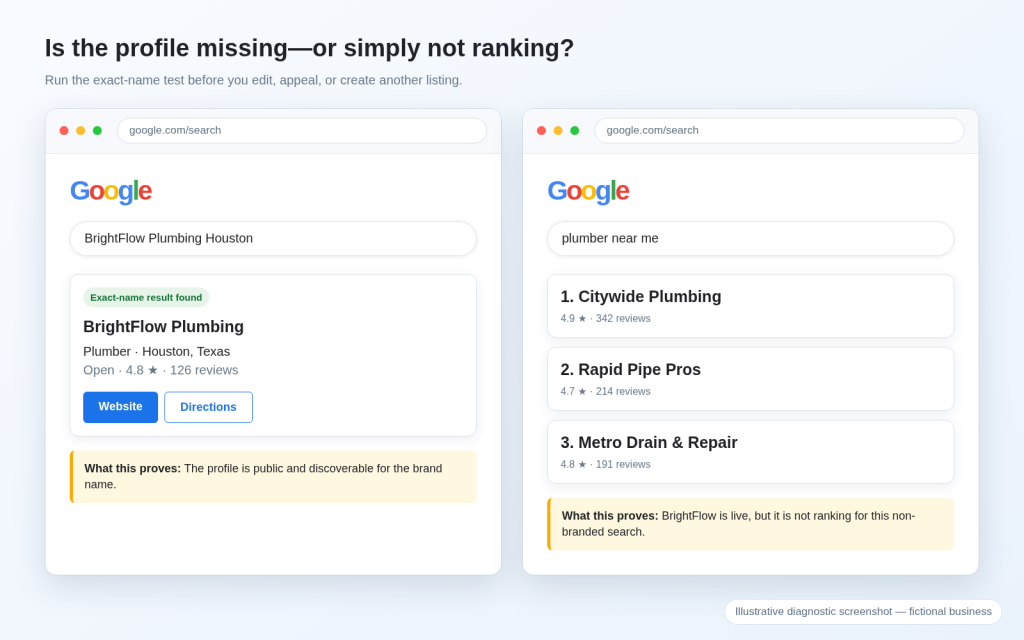
Illustrative screenshot: an exact-name result proves the profile is public; a missing service-keyword result points to local ranking.
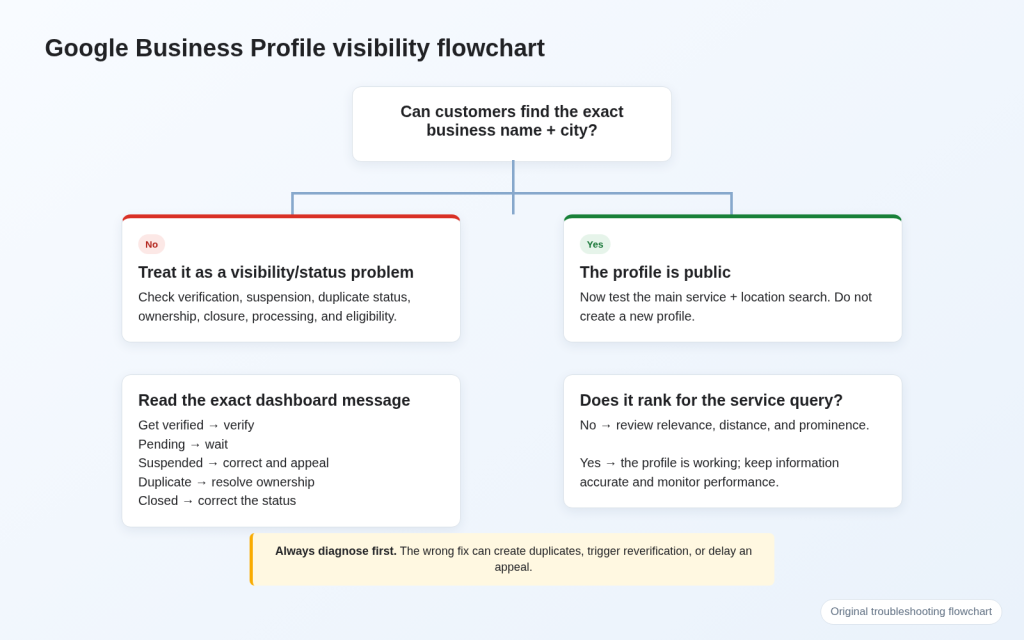
| Fast interpretationExact name not found: check status and eligibility. Exact name found but service keyword missing: move to the ranking section. Do not create a second profile until you know which situation applies. |
Use the Diagnostic Flowchart
Read the Exact Profile Status Before You Edit Anything
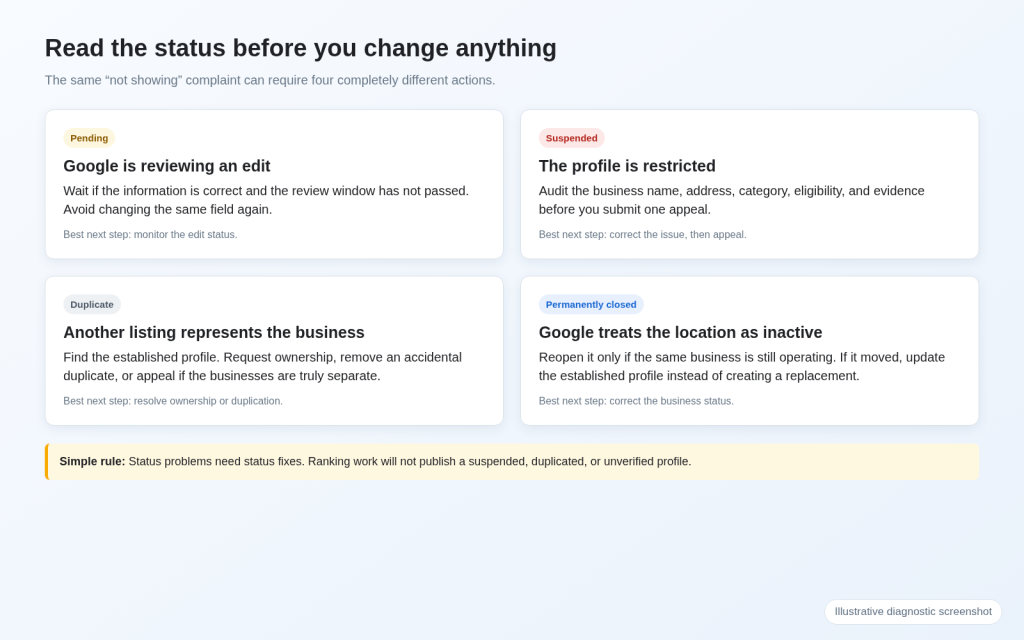
Sign in to the Google account connected to the business, open the profile, and read the exact status message. The wording tells you whether to verify, wait, appeal, resolve a duplicate, or correct a closure. Ranking work cannot publish a suspended, duplicated, or unverified profile.
| What you see | What it usually means | Best next step |
| Get verified | Verification is incomplete or required again. | Use the method Google shows. |
| Pending / Processing | Google is reviewing a profile or edit. | Wait; avoid repeated edits. |
| Suspended / Disabled | The profile or account is restricted. | Correct the issue, then appeal. |
| Duplicate | Another profile represents the same business. | Resolve ownership or duplication. |
| Permanently closed | Google treats the location as inactive. | Correct the status or update a move. |
| Exact name appears, service query does not | The profile is public but not ranking well. | Work on relevance, distance, and prominence. |
1. You Are Signed In to the Wrong Google Account
Sometimes the listing is still live, but the current account cannot manage it. This often happens when a former employee, agency, partner, or old company email created the profile.
What you will see
Customers can find the business, but you do not see “Edit profile” or “Business Profile settings.”
Google shows “Own this business?” or says someone else may manage it.
You can edit some information but cannot add users or transfer ownership.
How to fix it
1. Check every Google account that the owner, team, or former agency may have used.
2. Open “People and access” when management controls appear.
3. Confirm whether the account is the primary owner, an owner, or a manager.
4. If another account owns the correct verified listing, request ownership instead of creating a new profile.
Google’s official process says the current owner normally has three days to respond to an ownership request. Read Google’s ownership guidance before you start.
2. Your Google Business Profile Is Not Verified
An unverified business profile may not appear normally, and the owner cannot fully control how it displays. Verification proves that the business exists and that an authorized person manages it. It does not guarantee top rankings.
What you will see
Get verified
Verification required
Processing
Review issues
Your verification was unsuccessful
Use the method Google provides
Google chooses the available verification methods automatically. The options can depend on the business type, public information, region, and business hours. You may see video, live video, phone, text, email, or mail, and some profiles may need more than one method
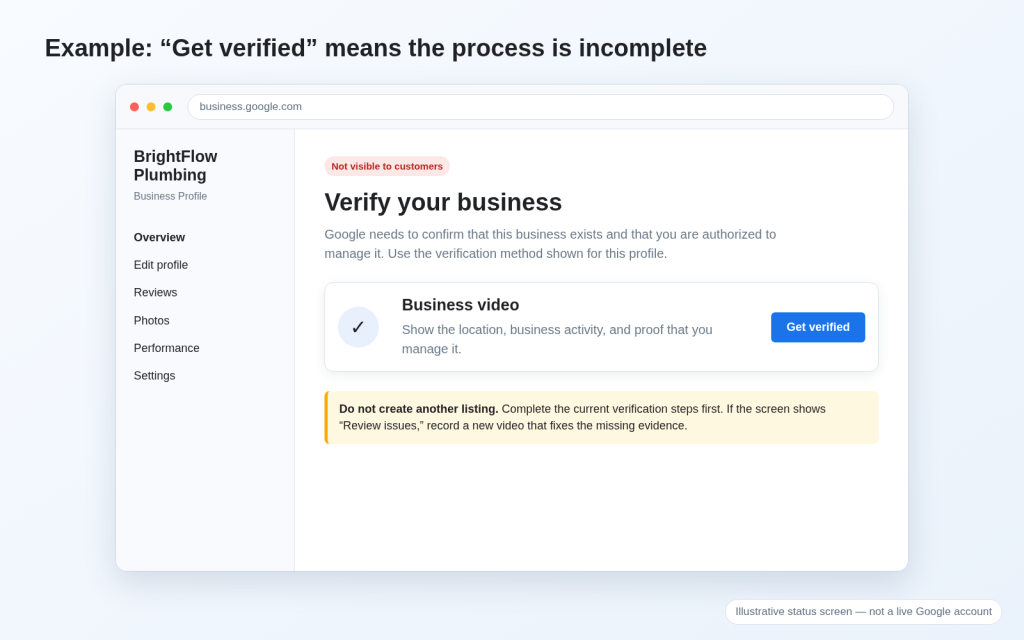
Prepare a stronger verification video
Google currently says a verification video must be live, unique, unedited, complete, recorded through the Business Profile on a mobile device, and at least 30 seconds long. It should prove three things: where the business operates, that the business exists, and that you are authorized to manage it.
Storefront: show the street, building number, permanent signage, customer entrance, operating space, and staff-only access.
Service-area business: show nearby location markers, tools, equipment, work vehicle, business documents, and proof of management.
Do not show private IDs, financial details, tax numbers, or other people’s faces.
Review the current requirements in Google’s video verification guide. After submission, the review can take up to five business days.
3. Your New Profile or Recent Changes Are Still Processing
A delay does not always mean that the profile has been rejected. Google may still be reviewing a new verification, checking an edit, or applying an approved change across Search and Maps.
Check the edit status
Accepted: Google approved the change.
Pending: Google is still reviewing the change.
Not approved: Google could not confirm the information.
Google says most profile edits are reviewed in about 10 minutes, but some can take up to 30 days. A pending edit does not always hide the whole profile; older public information may remain visible while the new information is reviewed.
| Process | Google’s published timing | What to do |
| Verification review | Up to 5 business days | Track the submission and avoid starting over. |
| Video verification review | Up to 5 business days | Check for “Review issues” before recording again. |
| Most profile edits | Usually up to 10 minutes | Check the edit status and public profile. |
| Complex pending edits | Sometimes up to 30 days | Do not resubmit the same accurate edit repeatedly. |
| Appeal review | Up to 5 business days | Do not file multiple appeals for the same issue. |
What to do while you wait
Record the submission date and the exact field you changed.
Check the public profile while signed out.
Avoid changing the business name, address, category, phone, website, or service area again unless the information is wrong.
Take action if the status changes to “Not approved,” “Get verified,” “Suspended,” or “Duplicate.”
See Google’s edit-status guidance for current review timings and status definitions.
4. Your Profile Is Suspended, Disabled, or Restricted
A suspended or disabled profile may disappear from Google Search and Maps because Google believes the profile, its content, or the managing account breaks a policy. Editing random fields will not restore it. You need to find the likely issue, correct it, and submit a clear appeal.
Audit the profile before you appeal
Use the real business name shown on signs, the website, and customer-facing materials.
Remove city names, services, slogans, phone numbers, or other keyword stuffing from the business name.
Use a real operating address. Do not use a P.O. box, mailbox, or mailing-only virtual office.
Hide the address if customers do not visit the location.
Choose the category that best describes the core business.
Check for duplicate profiles and conflicting websites or phone numbers.
Prepare evidence that matches the corrected profile
Official registration, licence, or tax certificate
Utility bill with the same business name and address
Permanent signage, building, entrance, and interior photos
Tools, stock, equipment, or a branded work vehicle
Website contact page and other records that support the same business details
| Appeal warningGoogle says that once you open the evidence form, you must submit the evidence within 60 minutes. Appeal decisions can take up to five business days. Do not submit multiple appeals for the same issue while a decision is pending. |
Use Google’s suspended-profile guidance and the appeals guidance for the current process.
5. Your Business or Address Is Not Eligible
Verification cannot make an ineligible business eligible. A Google Business Profile generally represents a business that receives customers at a real location, travels to customers, or does both. A business that operates only online without in-person service is not eligible.
Choose the correct business model
| Business model | Customers visit | Business travels | Public address |
| Storefront | Yes | Not required | Displayed |
| Service-area business | No | Yes | Hidden |
| Hybrid business | Yes | Yes | Displayed |
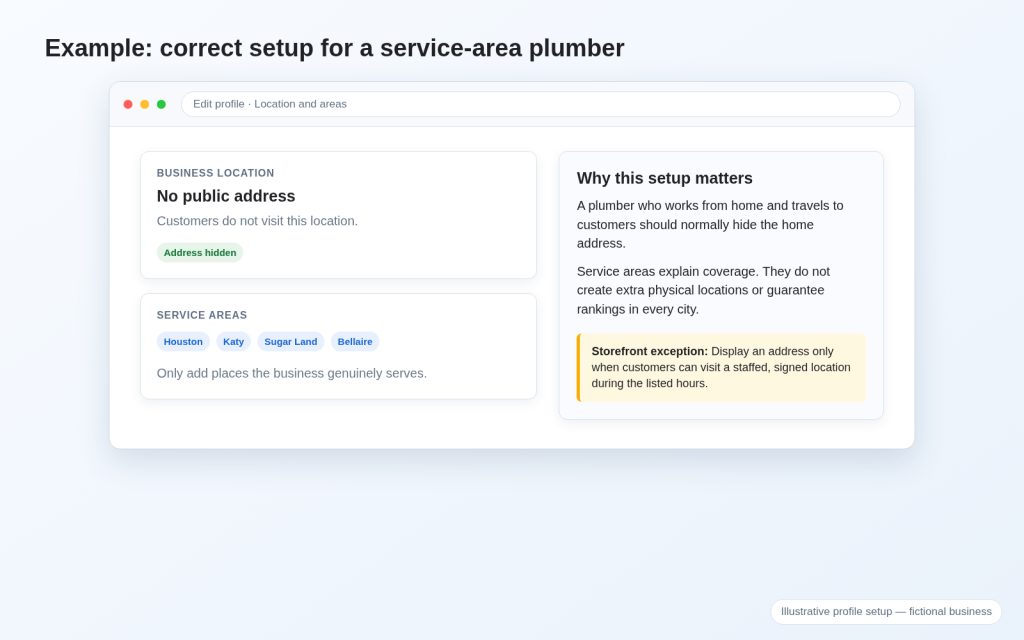
Illustrative screenshot: a service-area plumber hides the operating address and adds only genuine service areas.
Addresses that cause problems
P.O. boxes and remote mailboxes
Mail-forwarding or registered-agent addresses where the business does not operate
Virtual offices used only for mail or local visibility
Unstaffed locations with no customer access
Temporary meeting rooms or borrowed offices
Employee homes or storage units used to create city listings
A plumber who works from home and travels to customers can still qualify, but the home address should normally be hidden. Service areas tell customers where the company works; they do not create physical ranking locations in every city.
Read Google’s representation guidelines before changing the address or business model.
6. Google Has Detected a Duplicate or Ownership Conflict
Google generally allows one profile per business. If two profiles appear to represent the same company, Google may mark one as a duplicate and hide it from Search and Maps. The correct listing may also exist under another owner’s account.
How to find every version of the business
Search the current and previous business names.
Search the full address, old address, phone number, and website domain.
Compare reviews, photos, category, map pin, and ownership status.
Keep the profile that accurately represents the current business and holds the legitimate history.
Choose the correct fix
Another account owns the correct profile: request ownership.
You created a second profile by mistake: remove the accidental duplicate carefully.
Two public listings represent the same business: request a merge or report the duplicate.
Two distinct businesses share an address: appeal the duplicate decision with proof of separate signage and operations.
The company moved: update the established profile instead of creating a new one.
| Do not mark an active duplicate permanently closedA closed label can remain visible and confuse customers. Resolve ownership, duplication, or a business move through the correct process. |
Google states that a profile marked as a duplicate will not show in Search or Maps. Review Google’s duplicate-profile guidance.
7. Your Business Information Is Incorrect or Over-Optimized
A verified profile can still struggle when the business information is inaccurate, inconsistent, or written for keywords instead of customers. In serious cases, misleading information can trigger rejected edits, reverification, or suspension.
Fix the fields that matter most
Business name: use the real-world name only.
Primary category: choose what the business is, not every service it offers.
Address and map pin: make them accurate and consistent with real operations.
Phone and website: connect directly to the same business and location.
Hours: keep regular and special hours current.
Services and description: write for customers; avoid lists of repeated keywords and city names.
Align the website with the profile
The website should confirm the same name, phone number, location, service area, and core services. If the profile is live but weak for competitive searches, review the broader reasons a website may not rank on Google. Website relevance and authority can support the wider local search presence, but they will not fix an unpublished or suspended profile.
For help with profile, website, and map visibility together, explore NK Marketing Solutions’ SEO services.
8. Your Business Is Marked Closed or Moved
A “Temporarily closed” or “Permanently closed” label changes how customers see the business. It can also explain why the listing is missing from normal active-business results.
Check what actually happened
Same business, same location, still open: correct the closure status.
Business temporarily paused: use the temporary closure option accurately.
Business moved: update the address on the established profile and complete reverification if requested.
Old branch really closed: keep the truthful closure status and maintain the active location separately.
Do not reopen an old profile simply to preserve rankings when the location or business identity changed. The profile, website, phone, signage, and real operation should tell one consistent story.
9. Your Profile Is Live but Not Ranking for Local Searches
This is the most common source of confusion. Your verified business may appear for its exact name and still fail to appear for “plumber near me,” “dentist in Karachi,” or another competitive service query. That does not automatically mean the profile is suspended.
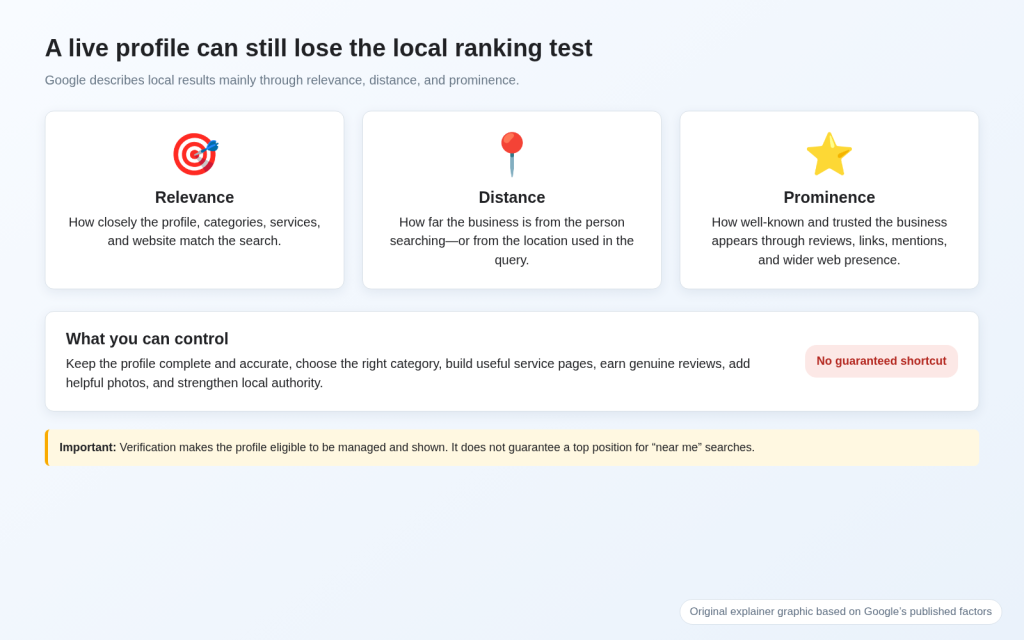
Original graphic: Google describes local ranking mainly through relevance, distance, and prominence.
Relevance: how well the profile and website match the search.
Distance: how far the business is from the person searching or the location in the query.
Prominence: how well-known and trusted the business appears through reviews, links, mentions, and wider web presence.
Google also says there is no way to request or pay for a better local ranking. Avoid anyone who guarantees Map Pack placement through a fixed number of reviews, weekly posts, geotagged photos, or a long list of service areas.
How to improve local visibility safely
Choose the most accurate primary and additional categories.
Complete the profile with accurate hours, services, attributes, photos, and contact details.
Build useful website pages for real services and real locations.
Earn genuine customer reviews and respond professionally.
Keep important business details consistent across trusted websites and directories.
Track visibility from several points in the target area instead of relying on one personalized search.
For tracking Maps visibility, citations, reviews, and geo-grid rankings, see NK Marketing Solutions’ guide to the best local SEO tools. Google’s official ranking explanation is available in Tips to improve your local ranking.
Should You Wait, Fix the Profile, Appeal, or Contact Support?
| Situation | Best action | Why |
| Accurate edit shows Pending | Wait | Google is actively reviewing it. |
| Get verified or Review issues | Verify again | The profile needs more proof. |
| Suspended or Disabled | Correct and appeal | The profile has a policy or eligibility restriction. |
| Duplicate or ownership conflict | Resolve access/duplicate | Another profile may represent the business. |
| Exact name visible, service query missing | Improve local SEO | The profile is live but not competitive for that query. |
| Status remains stuck beyond the published window | Contact support | The process may need manual review. |
What to include in a support request
Business Profile ID
Public Google Maps URL
Exact status or error message
Submission date for verification, edit, ownership request, or appeal
Screenshots that show the current issue
The exact field or problem involved
Documents or photos that support the correct information
A short explanation of what you already tried
Get a Free Google Business Profile Visibility Audit
| Stop guessing which fix you need NK Marketing Solutions can check whether the profile is missing, restricted, duplicated, incorrectly configured, or simply not ranking. The audit reviews the exact-name test, dashboard status, category, address, service area, website alignment, and local visibility—then gives you the safest next steps in priority order. |
- Public visibility and exact-name test
- Verification and dashboard status
- Duplicate and ownership risk
- Business name, category, address, map pin, and service areas
- Branded versus non-branded visibility
- Website alignment and internal SEO support
- Clear next actions without unnecessary profile changes